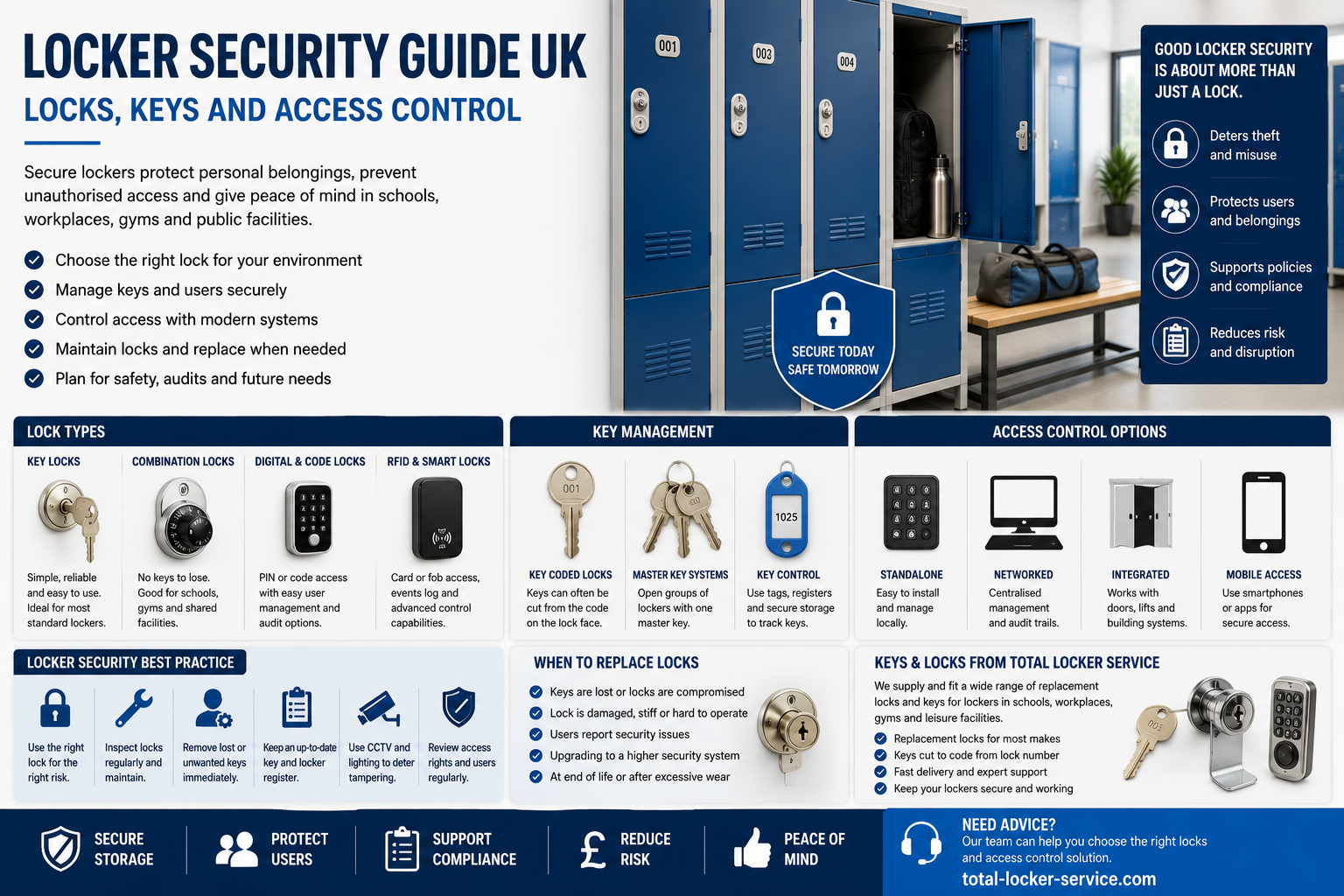
Locker security is not created by the lock alone. A secure locker system depends on the locker body, door strength, lock type, key control, user behaviour, staff procedure, room layout, installation quality and maintenance process. A strong lock on the wrong locker, in the wrong place, with poor key control can still fail in daily use.
More information about locker specifications, configurations and storage options is available from the Total Locker Service website.
Schools, workplaces, gyms, leisure centres, warehouses, offices, healthcare buildings and commercial sites all use lockers differently. Some sites need simple assigned storage with keys. Others need shared-use lockers with combination or digital locks. Some need master key control. Others need audit trails, RFID access or a planned upgrade from older lock systems.
The right locker security choice should match the risk, the user and the management process. A school corridor locker does not need the same access system as a visitor locker in a leisure centre. A staff locker in a factory does not need the same control as a smart locker used for laptops or handheld devices.
This guide explains the main locker security options in the UK, including key locks, padlock fittings, coin locks, combination locks, digital locks, RFID locks, master keys, spare keys and replacement procedures.
For product support and replacement locks, see replacement locker locks from Total Locker Service. Replacement keys cut to code, see replacement locker keys. For the deeper Total Locker Service security article, read the locker security guide.
Quick answer: what makes a locker secure?
A locker is secure when the locker construction, lock type, access method and management process match the level of risk. The lock must suit the user group. Keys, codes and master keys must be controlled. The locker must be installed correctly. Staff must know how to handle lost keys, forgotten codes, abandoned locks and emergency access.
A practical locker security system should include:
- A suitable locker material for the environment
- A lock type that matches assigned or shared use
- A clear key, code or credential process
- Controlled spare keys or override access
- Master key control for authorised staff only
- A lost key and replacement key procedure
- A process for damaged locks and forced doors
- Clear user instructions
- Regular inspection and maintenance
- Accurate locker numbering and records
The best lock is not always the most advanced lock. It is the lock that the site can manage correctly every day.
Why locker security needs a system approach
It is easy to think of locker security as a product choice. Key lock, combination lock, digital lock or RFID lock. In practice, security is a system. The lock is only one part of that system.
A locker security system includes the physical locker, the access method, the people using it, the room layout, the staff responsible for it and the procedure used when something goes wrong.
For example, a key lock can be secure when the locker is assigned to one user, the key code is recorded and spare keys are held safely. The same key lock becomes weak if keys are shared, spares are stored in an open drawer and nobody records missing keys.
A digital lock can provide better shared-use control, but it still needs management. Staff must know how to reset codes, replace batteries, handle lockouts and manage override access. If nobody owns that process, the digital lock becomes another source of disruption.
The starting question should therefore be: what level of control does the site need and what level of management can it maintain?
Common locker security risks
Most locker security issues are predictable. They happen because users lose keys, forget codes, share access, force doors, leave lockers abandoned or use the wrong type of lock for the setting.
Common risks include:
- Lost locker keys
- Uncontrolled spare keys
- Master keys stored insecurely
- Codes written down or shared
- Padlocks left behind by users
- Locks forced after forgotten access
- Old or worn lock barrels
- Doors bent by impact or misuse
- Locks unsuitable for wet areas
- Unnumbered lockers
- No record of who uses each locker
- No process for abandoned lockers
- No plan for lock replacement
Many of these problems can be reduced without replacing every locker. Better records, key control, user instructions and planned lock replacement can make an existing locker estate more secure and easier to manage.
Match locker security to the environment
A locker security plan should reflect the site. A school, gym, office and warehouse may all use lockers, but their risks are different.
| Environment | Main security need | Common lock choices |
|---|---|---|
| School | Durable assigned storage and simple staff control | Key locks, mastered key systems, combination locks in selected areas |
| Workplace | Staff belongings, uniforms and shift-based access | Key locks, hasp locks, combination locks, digital locks |
| Gym or leisure centre | Short-term visitor access and high turnover | Coin locks, hasp locks, digital locks, RFID locks |
| Office | Hybrid working, personal storage and device security | Combination locks, digital locks, RFID locks, assigned key locks |
| Warehouse or factory | PPE, boots, clothing and staff welfare storage | Key locks, hasp locks, heavy-duty lock options |
| Healthcare staff area | Controlled staff storage and cleanable access | Key locks, digital locks, managed access systems |
The lock should never be chosen in isolation. It should be chosen with the user group, risk level, supervision, replacement process and daily management capacity in mind.
Key locks for lockers
Key locks are one of the most common locker lock types. They are simple, familiar and suitable for many assigned locker systems. A user receives a key for a specific locker. Staff may hold a spare key or master key, depending on the system.
Key locks work well where lockers are assigned to named users, pupils, staff members or long-term occupants. They are also useful where the site wants a clear physical access method without codes, batteries or electronic credentials.
The main weakness is key loss. This does not make key locks unsuitable. It means the site needs a key management process.
A good key lock process should include:
- A record of each locker number
- A record of each key code
- A record of who has each key
- A secure spare key store
- A master key control process, if used
- A replacement key procedure
- A lock replacement rule for stolen or compromised keys
Where the code is known, many replacement locker keys can be cut to code. Total Locker Service supplies replacement locker keys for many common locker brands and key ranges.
Padlock hasps and user-owned padlocks
A padlock hasp allows the user to lock the locker with a padlock. The padlock may be supplied by the site or brought by the user. This is a simple and flexible option, especially where the site does not want to manage individual locker keys.
Padlock systems can work well in workplaces, schools, warehouses, gyms and temporary-use areas. They are easy to understand and do not require a key schedule for every locker if users provide their own padlocks.
The weakness is emergency access. If a user forgets a padlock code, loses a padlock key or leaves a padlock behind, staff may need a procedure for removing it. This should not be improvised.
A padlock policy should state:
- Whether users can bring their own padlocks
- What padlock size is suitable
- What happens if a padlock is abandoned
- Who can authorise removal
- How users are notified
- How damage is avoided during removal
Padlock hasps reduce site key management, but they do not remove the need for access control.
Coin locks for shared locker use
Coin locks are common in leisure centres, gyms, swimming pools and visitor changing rooms. They suit short-term shared use. A user inserts a coin or token, locks the door and takes the key. When the key is returned, the coin may be returned or retained depending on the lock type.
Coin locks work well where lockers are not permanently assigned. They encourage turnover and are familiar to many visitors.
However, coin locks still need management. Staff must handle lost keys, jammed coins, damaged lock barrels, abandoned lockers and worn wrist straps. In wet areas, the lock must also suit the environment.
Coin locks are useful when the site wants a simple visitor-access model. They are less suitable where detailed user accountability or audit trails are required.
Mechanical combination locks
Mechanical combination locks remove the need for a physical user key. This can reduce lost key issues. They are often used in offices, staff areas, schools, gyms and commercial buildings.
Combination locks work best when users can remember codes and staff have a clear reset process. They can suit both assigned use and shared use, depending on the lock model.
The main risks are forgotten codes, shared codes and poor reset management. Users may also set simple codes unless the lock or policy prevents it.
Before choosing combination locks, ask:
- Will lockers be assigned or shared?
- Who resets forgotten codes?
- Is an override key or management tool available?
- Can users change codes?
- How are abandoned locked lockers opened?
- Will the user group manage codes reliably?
Combination locks can improve convenience, but they need a simple staff procedure.
Digital keypad locks
Digital keypad locks allow access through a PIN or code. They are often used where sites want a more modern access method without issuing physical keys to every user.
Digital locks can suit offices, schools, leisure centres, healthcare staff areas and managed workplace storage. Some models support assigned use, shared use, management codes, audit options or override access.
The advantages include convenience, reduced key issuing and flexible access. The management requirements include battery checks, reset procedures, staff training and correct configuration.
Digital locks are not automatically better than key locks. They are better when the site can manage digital access reliably.
Total Locker Service supplies replacement locker locks, including mechanical and electronic options for many locker systems.
RFID locker locks and smart access
RFID locks use cards, fobs or compatible credentials to open lockers. They are useful where a site already uses access cards or wants a cleaner user experience than keys or PINs.
RFID and smart locker systems can be useful in offices, gyms, leisure centres, universities, healthcare settings and managed commercial buildings. They can support shared use, assigned use and more structured access control depending on the system.
Smart access is strongest when it is part of a planned system. It should not be treated as a simple lock swap if the site also needs user permissions, administration, audit trails or integration with wider access systems.
For a wider view of smart systems, link users to the smart locker systems UK guide. For practical access planning, use the locker access control systems UK guide.
Master key control
Master keys can make locker management easier, but they also increase responsibility. A master key gives authorised staff the ability to open a group of lockers. This is useful for lost keys, abandoned lockers, emergency access and maintenance.
However, a master key should never be treated as an ordinary spare key. If it is lost or misused, the security issue is wider than one locker.
A master key process should include:
- Named authorised holders
- Secure storage
- Restricted access
- Sign-out records where appropriate
- Clear emergency access rules
- Regular checks that the key is present
- A response plan if the master key is lost
Schools, gyms, workplaces and commercial facilities should decide in advance who can use a master key and when. That decision should not be made during a busy lockout or incident.
Spare key storage and key cabinets
Spare locker keys should be useful but controlled. A spare key that cannot be found is not useful. A spare key stored openly is not secure.
For larger locker systems, spare keys should be stored in a structured way. A key cabinet or controlled key store can help staff find the correct key quickly while reducing unauthorised access.
A practical spare key system should record:
- Locker number
- Key code
- Location
- User or group
- Spare key status
- Replacement key history
- Lock changes
Key records should match the physical locker layout. If lockers are renumbered, moved or replaced, the key record must be updated. Otherwise, staff may believe they have spare keys when the codes no longer match the installed locks.
Replacement locker keys and key codes
Replacement keys are often easier and cheaper than replacing complete locks. Many locker keys can be cut to code when the correct number is visible on the key, lock face or site records.
The key code is not always the same as the locker number. The locker number identifies the door or compartment. The key code identifies the key cut. Good records should include both.
Before ordering replacement keys, collect:
- Locker number
- Key code
- Lock brand, if known
- Locker brand, if known
- Quantity required
- Photo of the key or lock face if uncertain
- Delivery details
- Purchase order details, if needed
Total Locker Service supplies locker keys cut to code for many common locker brands. The keys by manufacturer page can also help where the locker or lock brand is known.
When to replace the lock instead of the key
A lost key does not always mean the lock must be replaced. If the key has simply been misplaced and the code is known, a replacement key may restore access quickly.
However, lock replacement may be the safer option when the key is stolen, copied, deliberately misused or linked to a security concern. It may also be needed when the lock is damaged, worn, obsolete or no longer suitable for the way the locker is used.
Consider replacing the lock when:
- The lock is damaged or unreliable
- The key has been stolen
- The locker has been accessed without permission
- The key code cannot be identified
- The lock type no longer suits the site
- The master key system has been compromised
- The site is standardising lock types
- The locker is being refurbished
- Users repeatedly experience access problems
For replacement and upgrade options, use locker locks from Total Locker Service.
Locker access control for assigned use
Assigned use means one person is allocated a specific locker for a period of time. This is common in schools, workplaces, staff changing rooms and long-term storage areas.
Assigned use works well with key locks, combination locks and some digital systems. The important point is accountability. The site should know who has which locker and how access is controlled.
An assigned-use locker record should include:
- User name or group
- Locker number
- Location
- Lock type
- Key code or access method
- Issue date
- Return date where relevant
- Lost key or lockout history
Assigned use is usually easier to manage when the site has stable users. It becomes harder when users change often or where lockers are shared informally without records.
Locker access control for shared use
Shared use means lockers are not permanently assigned. Users choose or are given a locker for short-term use. This is common in gyms, leisure centres, visitor areas, offices with hot desking and flexible workplaces.
Shared use requires a different access strategy. The site must decide how users claim a locker, how long they can keep it, what happens if they leave items behind and how staff open lockers at the end of the day.
Shared-use options may include:
- Coin locks
- Padlock hasps
- Mechanical combination locks
- Digital keypad locks
- RFID locks
- Smart locker systems
Shared-use systems need clear user instructions. If users do not understand how to lock, unlock or release the locker, staff will spend more time dealing with avoidable lockouts.
School locker security
Schools need locker security that is durable, simple and manageable. Pupils need to access bags, books, coats and PE kit without constant staff intervention. Staff need a clear process for lost keys, broken locks, abandoned lockers and safeguarding concerns.
School locker security should include:
- Clear locker numbering
- Assigned pupil records
- Key code records
- Secure spare key storage
- Master key control
- A lost key procedure
- Rules on locker sharing
- End-of-year key recovery
- Repair and replacement planning
Combination locks may reduce lost key issues in some school areas, but younger pupils may forget codes. Key locks remain practical when the school maintains a proper key record.
Locker access linked to behaviour or safeguarding should follow the school’s own policy. A master key gives access, but it does not replace the need for a proper procedure.
Workplace locker security
Workplace lockers protect staff belongings, uniforms, PPE, tools and personal items. The right lock depends on whether lockers are assigned to staff, shared by shift workers or used by visitors and contractors.
Workplace security should consider:
- Staff turnover
- Shift patterns
- PPE and uniform storage
- Clean and dirty storage
- Visitor or contractor access
- Lost key procedures
- Management access
- Locker location and supervision
Key locks often work well for assigned staff lockers. Combination or digital locks may suit shared or flexible-use storage. Padlock hasps may be useful where users are expected to provide their own padlocks, but the site still needs an abandoned lock procedure.
For wider workplace locker options, use workplace lockers from Total Locker Service.
Gym and leisure locker security
Gyms and leisure centres have high user turnover. Lockers are often used for short periods by visitors who may not know the site. This makes clear access instructions essential.
Leisure locker security must account for:
- Visitor use
- Wet areas
- High-frequency locking and unlocking
- Lost keys or wrist straps
- Abandoned lockers
- Coin or token handling
- Staff override access
- Cleaning and maintenance
Coin locks, digital locks, RFID locks and padlock hasps can all work in leisure settings. The right choice depends on the user journey, supervision, membership system, wet-area conditions and staff procedures.
Office and hybrid workplace locker security
Offices increasingly use lockers for hybrid working, personal storage, laptop storage, visitor belongings and shared workspace management. These lockers may be assigned, day-use or department-based.
Office locker security should balance convenience and control. If users only need personal storage for the day, digital or combination systems may work well. If users need long-term assigned storage, key locks or assigned digital access may be suitable.
Where laptops and devices are stored, consider whether charging, ventilation and stronger access control are required. A standard personal locker may not be enough for powered device storage.
Locker room layout and security
Room layout affects locker security. A well-planned locker area is easier to supervise, easier to use and less likely to suffer accidental damage. Poor layout creates crowding, hidden corners and rushed access.
Security-aware layout should consider:
- Clear sight lines
- Adequate aisle width
- Space for doors to open fully
- Benches that do not block access
- Logical numbering
- Lighting
- Location away from unsupervised blind spots where practical
- Clear routes for staff inspection
For layout planning, use the Total Locker Service locker layout planning guide UK and the locker planning UK hub.
Locker maintenance and security
Maintenance is a security issue. A locker with a loose cam, bent door, worn barrel or missing number plate is more vulnerable to misuse and more frustrating for users.
Regular checks should include:
- Door alignment
- Hinges
- Lock operation
- Cams and fixings
- Number plates
- Keys and spare keys
- Master key function
- Digital lock batteries
- Coin lock operation
- Signs of forced entry
- Corrosion in wet areas
Small faults should be repaired early. Leaving a damaged lock in service encourages forcing, misuse and user complaints. Total Locker Service provides locker repair, parts and maintenance support for UK sites.
How to choose the right locker lock
Choosing the right locker lock is a decision about management as much as security. The lock must suit the user and the site’s ability to administer it.
| Question | Why it matters |
|---|---|
| Are lockers assigned or shared? | Assigned lockers often suit keys; shared lockers may suit coin, code, RFID or digital systems. |
| How often do users change? | High turnover usually needs simpler reset or release procedures. |
| Is there staff supervision? | Unsupervised areas may need stronger control and clearer rules. |
| Are users likely to lose keys? | Combination or digital options may reduce key loss but introduce code management. |
| Is emergency access required? | Master keys, override tools or management codes may be needed. |
| Is the environment wet? | Lock and locker materials must suit moisture and cleaning conditions. |
| Is an audit trail needed? | Higher-control sites may need smart or managed access systems. |
| Can the site maintain batteries or electronics? | Digital systems need planned maintenance. |
If the site cannot manage a more complex access system, a simpler lock with better key control may be the stronger choice.
Upgrading old locker locks
Older lockers do not always need complete replacement. In many cases, replacing locks, keys, barrels, number plates or damaged parts can extend the life of the locker estate.
A lock upgrade may be useful when:
- Keys are frequently lost
- The existing lock range is obsolete
- Many locks are damaged or stiff
- Different areas use too many lock types
- The site wants to standardise access
- Staff need better override control
- A shared-use area needs a different access method
- The locker estate is being refurbished
Before upgrading, identify the current lock type, fixing method, cam style, door thickness and hole preparation. Photos can help confirm compatibility before ordering. The locker locks page is the correct route for replacement and upgrade options.
Locker security checklist
Use this checklist to review an existing locker installation.
Locks and access
- Does the lock type match assigned or shared use?
- Are locks working smoothly?
- Are damaged locks recorded?
- Are replacement locks available?
- Are digital lock batteries checked?
- Are coin locks and wrist straps maintained?
Keys and codes
- Are key codes recorded?
- Are locker numbers and key codes kept separate?
- Are spare keys held securely?
- Is there a lost key process?
- Are master keys controlled?
- Are forgotten code procedures documented?
Users and records
- Is each assigned locker linked to a user or group?
- Are shared-use rules clear?
- Are abandoned lockers checked under a procedure?
- Are leavers and old users removed from records?
- Are staff trained to handle lockouts?
Physical condition
- Are doors aligned?
- Are hinges secure?
- Are cams and fixings tight?
- Are number plates present?
- Are lockers fixed or stabilised where needed?
- Is there corrosion, impact damage or forced entry evidence?
Frequently asked questions
What is the most secure locker lock?
The most secure locker lock depends on the site, user and risk level. A well-managed key lock may be suitable for assigned staff or school lockers. A digital or RFID lock may suit shared-use or higher-control areas. The strongest option is the one the site can manage correctly every day.
Are key locks good for lockers?
Yes. Key locks are simple, familiar and reliable for many assigned locker systems. They work best when key codes are recorded, spare keys are stored securely and lost keys are replaced through a clear process.
Are combination locks better than keys?
Combination locks reduce physical key loss, but users can forget or share codes. They can be better for some shared-use areas, but key locks may be better for assigned lockers where the site has strong key control.
When should a locker lock be replaced?
A locker lock should be replaced when it is damaged, worn, unreliable, compromised, unsuitable for the user group or no longer supported. Lock replacement may also be needed after theft, repeated key loss or a planned locker upgrade.
Can replacement locker keys be ordered by code?
Yes. Many locker keys can be cut to code if the correct code is visible on the key, lock face or site records. The locker number and key code are not always the same, so both should be recorded.
What is a locker master key?
A locker master key allows authorised staff to open a group of compatible locker locks. It is useful for emergency access, lost keys and maintenance, but it must be stored securely and controlled carefully.
Are RFID locker locks worth using?
RFID locker locks can be useful where a site already uses access cards or wants a managed, keyless experience. They work best when the site has a clear process for user credentials, staff override and maintenance.
Do locker locks need maintenance?
Yes. Locker locks should be checked for smooth operation, loose fixings, worn barrels, damaged cams, battery condition and signs of misuse. Regular checks reduce lockouts and extend the life of the locker system.
What is the best lock for gym lockers?
Gym lockers often use coin locks, padlock hasps, combination locks, digital locks or RFID locks. The best option depends on visitor turnover, wet-area conditions, staff supervision and how abandoned lockers are managed.
What is the best lock for school lockers?
School lockers often use key locks because they are simple and easy to manage when key records are accurate. Combination locks may suit older pupils or selected areas, but staff must have a reset or override process.
Conclusion: locker security is control, not just hardware
A secure locker system is not created by choosing the strongest-looking lock. It is created by matching the lock, user, site and management process.
Key locks, padlock hasps, coin locks, combination locks, digital locks and RFID systems can all be effective when used in the right setting. They can also all fail when the site has no procedure for keys, codes, master access, maintenance or abandoned lockers.
Start by deciding whether lockers are assigned or shared. Then decide how access should be issued, controlled, replaced and audited. Record key codes. Protect master keys. Maintain locks before they fail. Review whether old locks still suit the way the site works.
For deeper locker security advice, read the Total Locker Service locker security guide. Lock comparison, use the locker security options guide. For replacement hardware, visit replacement locker locks. For keys cut to code, visit replacement locker keys.