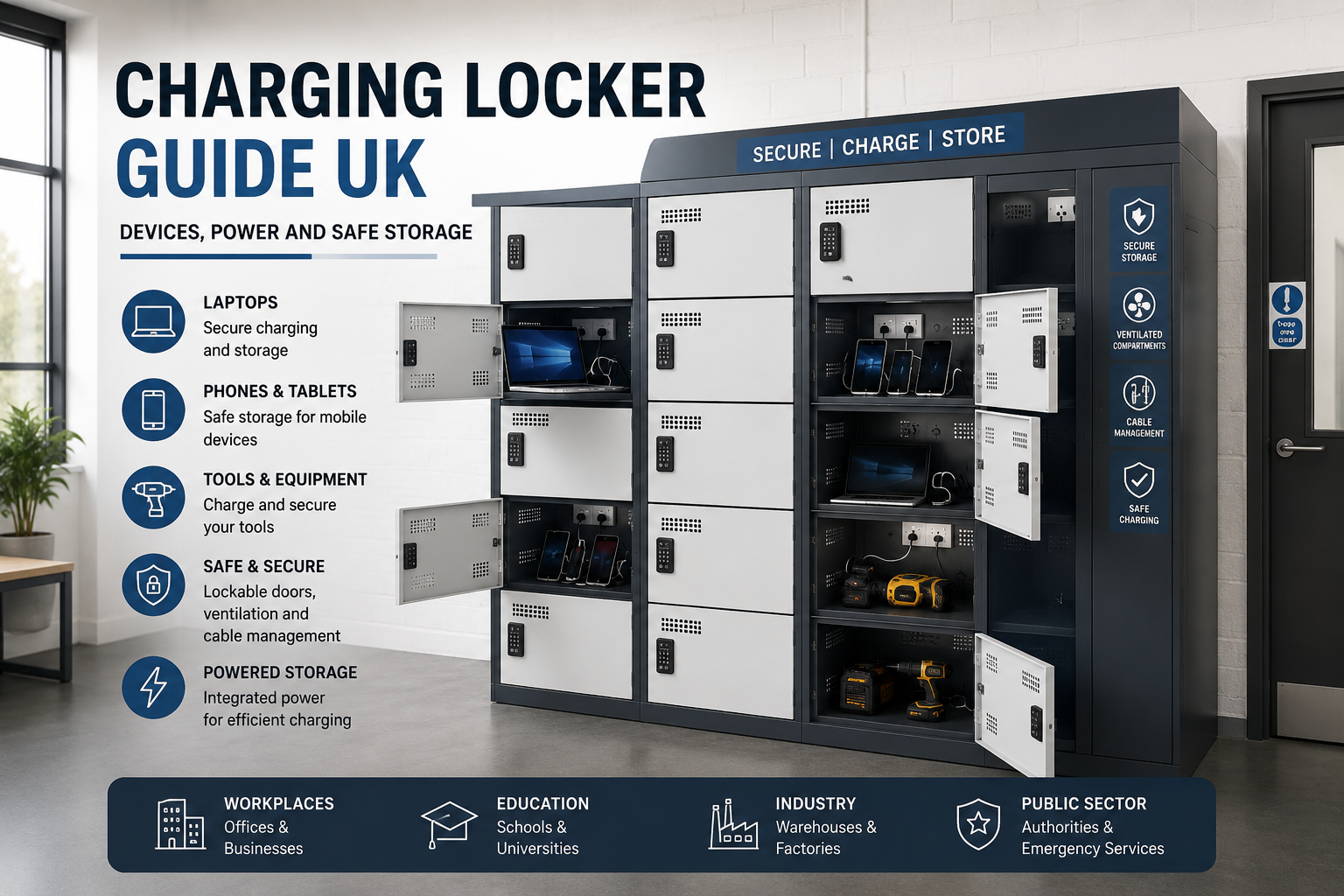
Charging lockers give UK workplaces, schools and commercial sites a secure way to store powered devices while they recharge. They are used for laptops, tablets, mobile phones, radios, scanners, cordless tools and other small electrical equipment. The right unit can reduce desk clutter, protect valuable devices, improve access control and help keep charging areas more organised.
When planning secure storage for education environments, see these school locker options for different pupil, staff and site requirements.
However, a charging locker is not just a normal locker with a socket inside. It should be chosen around the device type, charging method, power demand, cable management, ventilation, daily user flow and site safety rules. Poorly planned charging can create heat build-up, damaged cables, overloaded sockets, blocked access routes and management problems. A well-planned charging locker system solves those problems before they become daily issues.
Quick answer: what are charging lockers?
Charging lockers are secure storage units with integrated power points or USB charging inside the compartments. They allow users to lock away devices while those devices charge. They are commonly used in offices, schools, colleges, universities, healthcare settings, warehouses, workshops, retail sites, leisure centres and public buildings.
The best charging locker depends on what is being charged. A laptop locker needs different space, ventilation and cable access from a mobile phone locker. A tool charging locker needs stronger construction and enough compartment space for chargers and batteries. A tablet charging unit may need higher capacity but smaller compartments. Choosing the right type matters because each device group creates a different mix of security, power and management requirements.
Why charging lockers matter
Most organisations now rely on portable technology. Staff use laptops for hybrid working. Schools use tablets and laptops in classrooms. Warehouses use scanners and radios. Workshops use cordless tools. Leisure centres and public buildings may need phone charging points for staff or visitors. Without a managed storage system, those devices often end up on desks, shelves, floors, window sills, staff room tables or shared extension leads.
That creates several problems. Devices can be misplaced, damaged or stolen. Cables can become tangled. Chargers can be swapped or lost. Sockets can become crowded. Staff may not know which device is charged and ready to use. In busy areas, loose charging equipment can also obstruct walkways or create poor housekeeping. A charging locker gives each item a defined place, a controlled charging point and a secure compartment.
Charging lockers are also useful because they separate storage from work surfaces. Desks stay clearer. IT teams can manage shared equipment more easily. Facilities teams can keep charging away from unsuitable areas. Users can collect a charged device at the start of a shift, lesson or working day and return it when finished. That makes the locker part of the wider storage system, not just a piece of furniture.
Charging lockers vs standard lockers
A standard locker provides secure storage. A charging locker provides secure storage with controlled access to power. That difference affects design, location and management. A standard locker can usually be placed wherever it fits, provided the layout is safe and practical. A powered locker also needs suitable access to electrical supply, cable routes, ventilation and maintenance access.
| Feature | Standard locker | Charging locker |
|---|---|---|
| Main purpose | Stores personal items, bags, clothing or equipment | Stores and charges electronic devices |
| Power requirement | None | Requires suitable mains connection or powered charging system |
| Typical contents | Bags, coats, uniforms, PPE, tools or personal belongings | Laptops, tablets, phones, radios, scanners, tools or batteries |
| Planning issue | Size, lock type, layout and user access | Size, lock type, layout, power load, cables, ventilation and safe charging location |
| Best use | General secure storage | Secure powered storage for valuable devices |
For general staff belongings, a normal locker may be enough. For laptops, tablets, mobile phones or tools that need charging, a purpose-designed charging locker is usually the stronger solution. It gives the device a secure place and helps stop ad hoc charging across the building.
Devices that can use charging lockers
The phrase “charging locker” covers several types of powered storage. The right choice depends on the device. A unit that works well for phones may be too small for laptops. A laptop locker may be unnecessary for small handheld scanners. A tool charging locker may need more robust construction than an office device locker.
Laptop charging lockers
Laptop charging lockers are used in offices, schools, colleges, universities, training centres, libraries and shared workspaces. They provide compartments large enough for laptops and chargers. They are useful for hybrid working, hot desking and shared device fleets.
For office environments, laptop charging lockers help staff store work devices securely between shifts or visits. For education, they can support classroom laptop sets, sixth form areas, IT suites and staff device storage. The main planning points are compartment size, number of users, power type, charging schedule and lock management.
Laptop and tablet storage and charging lockers are a strong choice when the site needs secure charging for larger portable devices.
Tablet charging lockers
Tablet charging lockers are often used where many smaller devices must be stored together. Schools, training centres, healthcare sites and public-sector teams may use tablets in batches. The locker should make it easy to identify, return and charge each device without creating a cable mess.
Tablet charging storage should be planned around capacity and routine. A class set may need all devices charged overnight. A healthcare or facilities team may need staggered charging during the day. A good layout allows users to return devices quickly and keeps chargers controlled.
Mobile phone charging lockers
Mobile phone charging lockers are smaller and higher density than laptop units. They are useful in workplaces, schools, factories, leisure centres, gyms, events, reception areas and controlled staff zones. They can help organisations keep phones secure while users work, train, exercise or attend a site.
Phone lockers can be helpful where phones are not allowed in operational areas. They can also support visitor storage, staff break areas and locations where people need a safe place to charge a phone. Depending on the model, charging may use a UK plug socket, USB-A, USB-C or a mixed option.
Total Locker Service supplies mobile phone charging lockers for secure small-device storage and charging.
Tool charging lockers
Tool charging lockers are designed for cordless hand tools, tool batteries and small portable appliances. They are commonly used in workshops, factories, maintenance departments, construction support areas, facilities teams and engineering stores. They help keep equipment secure and ready for the next shift.
A tool charging locker should offer enough compartment space for chargers, plugs and equipment. It should also be robust enough for industrial use. In many workplaces, tool charging lockers also support inventory control because users know where tools should be returned at the end of a task.
For workshop and facilities use, see tool charging lockers.
Radios, scanners and handheld equipment
Many sites use smaller rechargeable devices that are not laptops or phones. These include handheld scanners, two-way radios, barcode readers, payment terminals, inspection devices and stock-control units. Charging lockers can keep this equipment secure, labelled and ready to use.
For these devices, compartment size and cable control are important. Users should be able to return equipment quickly without unplugging the wrong charger or leaving cables hanging outside the compartment. A clear numbering system can help match devices to teams, zones or shifts.
E-bike and e-scooter batteries need separate risk assessment
E-bike and e-scooter batteries should not automatically be treated like phones, laptops or tablets. They may involve larger lithium-ion battery packs, higher energy storage and different fire risk considerations. A standard charging locker for small devices should not be assumed to be suitable for damaged, modified, uncertified or high-risk battery packs.
If a site needs to store or charge e-bike batteries, e-scooter batteries or larger lithium-ion battery packs, the responsible person should assess that use separately. Fire risk assessment, location, supervision, charger compatibility, battery condition, insurer requirements and specialist battery storage may all be relevant. Do not place high-risk batteries in a standard charging locker without confirming that the locker is suitable for that specific use.
Power requirements and socket planning
Power planning is one of the most important parts of choosing charging lockers. It is easy to count compartments and forget the electrical load. A locker with many compartments may charge many devices at the same time. The site must be able to support that use safely.
The first question is simple: what will be charged? A phone may use a small charger. A laptop may use a higher wattage charger. A power tool battery charger may use more power again, depending on the battery and charger type. The second question is how many devices will charge at once. The third question is where the locker will connect to power.
UK three-pin sockets
UK three-pin sockets are useful when each device has its own mains charger. They are common for laptops, tool chargers and some larger devices. The benefit is flexibility. Users can plug in the charger supplied with the device. The drawback is that each compartment needs enough space for the plug, charger body, cable and device.
When planning UK socket charging, avoid cramming chargers into tight spaces. Chargers need air around them. Cables should not be sharply bent, crushed by doors or stretched across compartments. The locker should allow the user to connect and disconnect equipment without damaging plugs or leads.
USB charging
USB charging can be useful for phones, tablets and smaller devices. It may reduce the need for bulky plug-top chargers inside each compartment. USB-A is still common on many sites, while USB-C is increasingly important for newer phones, tablets and accessories.
Before choosing USB charging, check the devices that will be used. Some devices require higher power delivery than a basic USB point can provide. A USB point may keep a phone charged, but it may not be suitable for every tablet, laptop or specialist device. Matching the charging output to the device avoids slow charging and user frustration.
Mixed power options
Some sites need mixed charging. For example, a staff area may need phone charging and laptop charging. A workshop may need tool batteries and handheld radios. A school may need tablets and laptops. In these cases, it can be better to separate device types into different locker banks rather than trying to make one unit do everything.
Separating device types makes management easier. It also helps with ventilation, cable layout, user permissions and maintenance. A phone locker can sit near reception or a staff area. A laptop charging unit may be better near an IT office or controlled work zone. A tool charging locker may belong in a workshop, stores area or maintenance room.
Avoid unmanaged extension leads
A charging locker should not be treated as an excuse to add unmanaged extension leads behind furniture. Extension leads, trailing cables and overloaded socket areas can create maintenance and housekeeping problems. If a powered locker is being installed, the electrical supply should be planned properly.
For larger installations, ask a competent electrical professional to confirm supply suitability. This is especially important when many compartments may be charging at the same time. The aim is to match the charging locker to a safe, suitable and maintainable power arrangement.
| Device type | Common charging method | Main planning point |
|---|---|---|
| Mobile phones | USB-A, USB-C or UK plug charger | High compartment count and simple user access |
| Tablets | USB or plug-top charger | Cable control and enough depth for protective cases |
| Laptops | UK plug charger or dedicated laptop power supply | Compartment size, charger space and heat management |
| Radios and scanners | Docking charger or plug-top charger | Numbered compartments and shift-based issue control |
| Cordless tools | UK plug charger | Robust construction, compartment size and charger ventilation |
Safe storage and charging location
The location of a charging locker matters. A powered locker should be easy to use, but it should not block escape routes, narrow corridors or create congestion. It should sit in a controlled area with suitable access to power and enough space for users to open doors safely.
Dont place charging lockers where open doors will obstruct circulation routes. Do not place them where users have to queue in a fire exit route. Do not place them in damp, exposed or unsuitable environments unless the unit has been selected for that environment. If the locker is used for staff devices, it should normally be placed in a staff-controlled area rather than an uncontrolled public space.
Charging areas should also be kept tidy. The benefit of a charging locker is partly organisational. Devices, chargers and cables should be inside the correct compartments, not spread around the surrounding floor or worktop. A labelled return process can help users keep the system consistent.
Keep charging away from escape routes
Charging should not compromise escape. This point is especially important for lithium-ion devices, e-bikes, e-scooters and shared residential or public environments. If a device fails while charging, people still need a safe route away from the area. A charging locker should be positioned so it does not block corridors, exits, stairwells or essential access points.
In workplaces, charging arrangements should be considered as part of wider risk assessment and fire safety management. The level of assessment should reflect the device type, quantity, charging location and site conditions. A few staff phones in a controlled office area are not the same risk profile as large tool batteries, damaged devices or high-capacity lithium-ion packs.
Separate normal device charging from damaged batteries
Charging lockers are intended for normal, serviceable devices. They should not be used as a dumping point for damaged, swollen, overheating, modified or suspect batteries. A device that smells unusual, becomes hot, changes shape, leaks, shows damage or has been involved in an impact should be removed from normal use and handled through the site’s safety process.
This is a management issue as much as a locker issue. Staff should know what to do when a charger, cable, battery or device appears unsafe. A simple reporting process can prevent unsafe equipment being returned to a charging locker at the end of a shift.
Ventilation and heat control
Charging produces heat. In normal use, this heat is usually manageable, but poor storage can make problems worse. Devices should not be packed tightly with soft items, paperwork, clothing or combustible materials. Chargers should not be covered. Cables should not be trapped. Compartments should have enough space for air movement around the device and charger.
Ventilation is especially important for laptops, tablets in protective cases, power tool batteries and devices charged in batches. A charging locker should be selected with heat dissipation in mind. It should also be used as intended. Blocking vents, overfilling compartments or storing unrelated items inside charging compartments can reduce performance and increase risk.
Location affects heat as well. Avoid placing charging lockers next to radiators, heaters or areas exposed to direct heat. Also avoid placing them in enclosed cupboards unless the wider space is suitable for the heat generated by multiple charging devices. Good planning keeps charging predictable and easier to manage.
Cable management inside charging lockers
Cable control is often the difference between a charging locker that works well and one that becomes untidy after a few weeks. Every device needs a clear charging path. Users should not have to pull cables across sharp edges or force doors closed against plugs. Cables should not hang out of compartments, trail across walkways or become mixed between users.
Good cable management improves safety, but it also improves user behaviour. If the locker is easy to use, people are more likely to return devices correctly. If every compartment is awkward, staff may start charging equipment elsewhere. That weakens the whole storage system.
- Match compartment size to the device and charger.
- Use clear numbering for shared devices.
- Keep cables inside compartments.
- Replace damaged charging leads promptly.
- Do not allow users to trap cables in doors.
- Remove redundant chargers from service.
Lock types and access control
The lock type should match how the charging locker will be used. The wrong lock creates daily management problems. A simple keyed lock may be fine for assigned staff compartments. A shared-use locker may work better with combination, coin return or electronic access. A school may need master access for staff. A leisure centre may need a system that handles public users and lost access events.
Charging lockers often store high-value devices. That makes access control more important than it might be on a basic coat locker. Consider who owns the device, who manages the charger, who needs override access and what happens when a user forgets a code or loses a key.
| Lock type | Best use | Management note |
|---|---|---|
| Cam lock with key | Assigned staff or controlled equipment storage | Simple and familiar, but keys must be managed |
| Hasp lock | Users bring their own padlock | Useful for flexible use, but padlock quality varies |
| Mechanical combination lock | Keyless use in schools, offices and leisure sites | Reduces key handling, but codes need management |
| Coin return lock | Leisure centres, gyms and public shared areas | Encourages temporary use and key return |
| Electronic keypad or RFID lock | Higher-control workplaces and shared facilities | Can support modern access control, depending on model |
For lock upgrades, replacement locks and access control options, see locker locks by usage type. For sites that use keyed locks, replacement locker keys cut to code can also help keep systems working without replacing complete lockers.
Assigned use vs shared use
Charging lockers can be managed in two main ways: assigned use or shared use. Assigned use means each person, team or device has a fixed compartment. Shared use means users take an available compartment when needed. Each model has advantages.
Assigned charging works well when staff have their own laptops or tools. It creates clear responsibility and reduces confusion. Shared charging works well in visitor areas, phone charging zones, leisure centres and flexible workplaces. It gives users access when needed without dedicating a compartment permanently to one person.
For shared device fleets, a hybrid model may be best. The compartment can be assigned to a device rather than a person. For example, scanner 12 always returns to compartment 12. That makes stock checks easier and helps managers see what is missing.
Choosing charging lockers by sector
Different sectors use charging lockers in different ways. The best unit for a school corridor is not necessarily the best unit for a workshop or hybrid office. Start with the daily routine, then choose the locker around that routine.
Offices and hybrid workplaces
In offices, charging lockers are often used for laptops, tablets and phones. They support hot desking, hybrid working and secure overnight storage. They can also reduce clutter because staff do not need to leave laptops and chargers on desks.
Place office charging lockers near controlled staff areas, IT stores, shared work hubs or admin zones. Avoid narrow corridors and reception pinch points. If users collect laptops at the start of the day, allow enough space for several people to access the locker at once.
For general workplace storage, see workplace lockers. For powered device storage, see laptop and tablet charging lockers.
Schools, colleges and universities
Education sites often need secure charging for tablets, laptops and student devices. A charging locker can support IT suites, classroom sets, staff devices, sixth form areas and controlled phone storage. Durability and supervision matter because devices may be used by many people throughout the day.
Schools should consider who has access to the locker, who can override locks and who is responsible for checking devices at the end of the day. Where devices are shared, numbering compartments can make issue and return easier. For younger users, simple routines are important. The system should be clear enough for staff to manage without creating extra admin.
For wider education storage, see school lockers.
Warehouses, factories and workshops
Industrial sites may use charging lockers for tools, radios, handheld scanners, inspection devices and maintenance equipment. The key requirements are durability, clear access control and practical charging space. Compartments should be large enough for the equipment and charger, not just the device itself.
Position industrial charging lockers where they support the workflow. A tool charging locker may belong near a workshop or stores area. Scanner charging may work better near shift start points or goods-in areas. Avoid locations where doors open into forklift routes, loading paths or narrow walkways.
For powered workshop storage, browse tool charging lockers.
Healthcare and care environments
Healthcare and care sites may use charging lockers for tablets, handheld devices, communication equipment and staff phones. Clean access, controlled storage and reliable return routines are important. The locker should be easy to manage without adding confusion to busy clinical or care workflows.
Powered device storage should be kept separate from medicines, clinical waste and unsuitable storage areas. Where devices are used for care records or communication, access control and accountability may be as important as charging speed.
Leisure centres, gyms and public buildings
Leisure and public sites may need phone charging lockers for visitors, members or staff. Shared-use locking is often important. Coin return, combination or electronic locks may be better than individually issued keys, depending on the site.
Public-use charging lockers should be placed in visible, managed locations. They should be easy to find, but they should not block circulation routes. Clear signs can explain how to use the locker, what can be charged and who to contact if access is lost.
For leisure storage, see leisure lockers.
Charging locker capacity planning
Capacity planning should start with real users, not just a product size. Count how many devices need charging now. Then consider growth, spare capacity and peak use. A locker that is full on day one may become a problem within a few months.
Also think about charging cycles. When every device must be charged overnight, the locker needs enough compartments for all devices. If devices rotate through charging during the day, a smaller locker may work. If users need permanent secure storage, the locker should be sized for the number of assigned users rather than just the number of devices charging at one time.
| Planning question | Why it matters |
|---|---|
| How many devices need charging? | Sets the minimum number of compartments |
| Will devices charge at the same time? | Affects electrical load and charging schedule |
| Are lockers assigned or shared? | Changes lock choice and compartment count |
| What size are the devices? | Determines compartment height, width and depth |
| Do chargers stay inside the locker? | Affects cable control and space requirements |
| Who manages faults or lost access? | Determines override, key control and admin process |
| Where will the locker be installed? | Affects power supply, user flow and fire safety planning |
As a simple rule, plan for the busiest realistic period. If 30 laptops need secure charging after 4pm, a 10-compartment unit will not solve the problem unless the charging routine is staggered. If 20 phones need occasional top-up charging during the day, a smaller shared-use phone locker may be enough.
Charging locker size and compartment depth
Size matters because devices are rarely stored alone. A laptop compartment may also need room for a charger, plug and cable. A tablet may have a protective case. A radio may use a charging dock. A tool battery charger may need more space than the battery itself.
Do not choose compartment dimensions based only on the bare device. Measure the full charging setup. Include the charger, plug, cable bend, protective case and any docking cradle. If the compartment is too tight, users may force equipment inside or leave the door open. Both outcomes weaken the system.
For broader locker layout planning, link this guide into your main locker planning canister. Charging lockers still need practical aisle width, door clearance and access space, just like other locker banks.
Charging locker installation checklist
Before installing charging lockers, check the location, electrical supply, user route and management process. A good installation should feel natural to use. Users should be able to approach the locker, open the door, connect the device, close the door and leave without creating a queue or obstruction.
- Confirm what devices will be charged.
- Measure devices with chargers, cases and cables included.
- Choose the right number of compartments.
- Check whether use is assigned, shared or device-based.
- Select the right lock type for the user group.
- Confirm suitable access to electrical supply.
- Use a competent electrical professional where required.
- Keep the locker away from escape routes and bottlenecks.
- Allow enough space for doors to open safely.
- Check ventilation and heat management.
- Plan cable management before the locker goes live.
- Create a process for damaged chargers, faulty cables and suspect batteries.
- Label compartments where devices are shared.
- Train users on how to return and charge equipment correctly.
- Schedule routine checks after installation.
Maintenance and routine checks
Charging lockers need routine checks because they combine physical storage, locks, cables and electrical use. The maintenance plan should be proportionate to the environment. A low-use office phone locker may need less frequent checking than an industrial tool charging locker used every shift.
Routine checks should include the locker body, doors, hinges, locks, cables, sockets, USB outlets, plugs, ventilation and signs of misuse. Look for damaged leads, loose fittings, blocked vents, overheating signs, missing keys, broken locks and devices left in the wrong compartments. Faults should be recorded and dealt with quickly.
Users should also know what to report. A simple instruction near the locker can help: do not use damaged chargers, do not trap cables in doors, do not block vents, do not store unrelated items in charging compartments and report any heat, smell, swelling, sparking or visible damage.
| Check | What to look for | Action |
|---|---|---|
| Locker doors | Doors open and close without trapping cables | Adjust, repair or remove from use if unsafe |
| Locks | Keys, codes or electronic access work correctly | Repair faults and maintain override process |
| Cables | No exposed wires, crushing, sharp bends or loose plugs | Replace damaged leads |
| Sockets and USB points | No visible damage, overheating marks or loose fittings | Take faulty outlets out of service |
| Ventilation | Vents are clear and compartments are not overfilled | Remove obstructions and remind users |
| User behaviour | Devices returned correctly and no clutter around the unit | Improve labelling, signs or training |
Common charging locker mistakes
Most charging locker problems come from poor planning rather than poor equipment. A good locker can still perform badly if it is installed in the wrong place, used for the wrong device type or managed without a routine.
- Choosing compartments that are too small for devices and chargers.
- Ignoring the electrical load created by many devices charging together.
- Putting the locker in a corridor pinch point.
- Using a standard locker for powered storage without proper charging design.
- Allowing damaged chargers to remain in use.
- Blocking vents with bags, paperwork or clothing.
- Mixing high-risk batteries with normal device charging.
- Providing no process for lost keys, forgotten codes or failed locks.
- Not labelling shared equipment compartments.
- Forgetting future capacity and buying too few compartments.
These mistakes are avoidable. Start with the device list, user routine and charging location. Then choose the locker around those facts.
Charging lockers as part of a wider locker system
Charging lockers work best when they are part of the wider storage plan. A site may need staff lockers for clothing, laptop lockers for work devices, phone charging lockers for small personal items, tool charging lockers for workshops and key control for management access. Treating these as connected systems helps avoid storage gaps.
For example, an office may use workplace lockers for coats and bags, laptop charging lockers near the hot-desk zone and key cabinets for facilities control. A school may use student lockers in corridors, tablet charging lockers for classrooms and replacement key support for lost locker keys. A workshop may use work lockers, tool charging lockers and controlled access to spare keys or equipment stores.
That system view is important for SEO as well as user experience. Charging lockers should connect to the main commercial lockers page, the charging lockers range, workplace storage, school storage, locker locks and key management. Those links help users move from general locker planning into the correct product route.
How to choose the right charging locker
The right charging locker should match the device, the user and the site. Do not start with the number of doors alone. Start with the problem the locker needs to solve. Is the site trying to protect laptops? Control phones? Charge shared tablets? Keep tools ready for work? Stop devices being left on desks? Reduce lost chargers? Improve fire safety management? Each answer leads to a different specification.
Once the use case is clear, choose the locker around five points: compartment size, power type, ventilation, lock type and location. These five points decide whether the locker will work smoothly in daily use.
- Device fit: the compartment must fit the device, case, charger and cable.
- Power fit: the charging method must match the device and site supply.
- Heat control: the design and location must allow sensible heat dissipation.
- Access control: the lock type must match assigned or shared use.
- Workflow: the locker must sit where users can access it without causing congestion.
If those points are correct, the locker will usually feel simple to use. If one is wrong, the system may become awkward. For example, a good lock will not fix poor cable management. A strong locker will not fix an unsuitable power location. A large number of doors will not help if compartments are too small for the chargers.
Charging locker buying checklist
Use this checklist before ordering charging lockers for a workplace, school or commercial facility.
- List every device type that will be charged.
- Confirm the quantity of each device.
- Separate phones, tablets, laptops and tools where needed.
- Measure devices with cases and chargers included.
- Decide whether compartments are assigned or shared.
- Choose a lock type that matches the management routine.
- Check if master access or override access is required.
- Confirm whether UK plug sockets, USB-A, USB-C or mixed charging is needed.
- Check power availability at the installation point.
- Consider the maximum number of devices charging at once.
- Keep the locker away from escape routes and congested corridors.
- Allow practical door clearance and aisle space.
- Check ventilation and avoid hot or enclosed locations.
- Plan labelling, user instructions and routine checks.
- Build in spare capacity for future device growth.
Final thoughts
Charging lockers are a practical way to manage secure powered storage. They help protect devices, organise charging, reduce clutter and support better control of portable equipment. They are especially useful where many people share technology or where valuable devices need a clear storage routine.
The best results come from planning the locker as part of the whole site. Think about the device, the power supply, the users, the location and the management process. A well-chosen charging locker can support daily operations for years. A poorly chosen unit can create cable problems, access problems and avoidable safety concerns.
Total Locker Service supplies charging lockers for laptops, tablets, phones, tools and workplace equipment. Browse the charging lockers range, view commercial lockers, or call 01284 749211 for help choosing the right powered locker system for your site.
Charging locker FAQs
What is a charging locker?
A charging locker is a secure locker with integrated power inside the compartments. It allows users to store and charge devices such as laptops, tablets, phones, radios, scanners or tools.
Are charging lockers safe?
Charging lockers can support safer charging when they are selected, installed and managed correctly. They should be matched to the device type, electrical supply, location, ventilation needs and site risk assessment. Damaged batteries or suspect chargers should not be used in normal charging lockers.
Can charging lockers be used for laptops?
Yes. Laptop charging lockers are designed to store and charge laptops securely. They need compartments large enough for the laptop, charger, plug and cable. They are common in offices, schools, colleges, universities and shared workspaces.
Can charging lockers be used for mobile phones?
Yes. Mobile phone charging lockers are designed for smaller personal devices. They are useful in workplaces, schools, leisure centres, gyms, events and visitor areas where phones need secure temporary storage and charging.
Can charging lockers be used for power tools?
Yes. Tool charging lockers are available for cordless tools, batteries and small portable appliances. They are commonly used in workshops, warehouses, factories, maintenance departments and facilities teams.
Do charging lockers need ventilation?
Yes. Charging produces heat, so ventilation and space around chargers matter. Compartments should not be overfilled, vents should not be blocked and chargers should not be covered by clothing, bags or paperwork.
Where should charging lockers be installed?
Charging lockers should be installed in a suitable controlled location with safe access to power, enough door clearance and good user access. They should not block corridors, exits, stairwells or escape routes.
Should charging lockers use key locks or combination locks?
The best lock depends on how the locker is used. Key locks can work well for assigned compartments. Combination, coin return, RFID or electronic locks may suit shared-use areas where users change regularly.
Can one charging locker be used for all devices?
Sometimes, but it is often better to separate device types. Phones, tablets, laptops and tools have different compartment, charging and ventilation needs. Separate units can make management easier and reduce cable problems.
Who supplies charging lockers in the UK?
Total Locker Service supplies charging lockers for UK workplaces, schools, public buildings, healthcare sites, leisure centres and commercial facilities. Options include laptop charging lockers, tablet charging lockers, phone charging lockers and tool charging lockers.