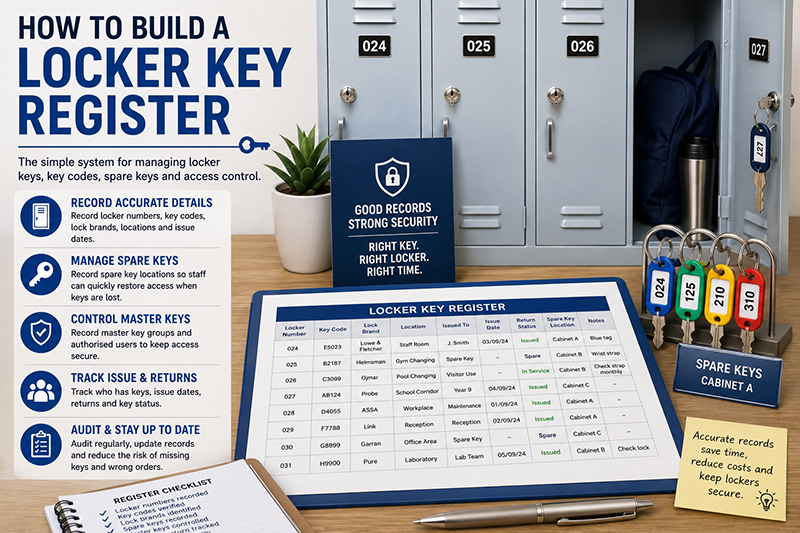
A locker key register is a simple record that shows which locker key belongs to which locker, where spare keys are stored, who has been issued a key and which key code should be used when ordering replacements. It helps schools, gyms, workplaces, universities, leisure centres and healthcare sites manage locker keys without relying on memory, loose notes or old labels.
Without a register, a lost locker key can become a slow and expensive problem. Staff may not know whether the locker door number is the same as the key code. Spare keys may be hard to find. Master keys may be poorly controlled. Replacement keys may be ordered from the wrong number.
This guide explains how to build a locker key register, which fields to include, how to separate locker numbers from key codes, how to manage spare keys and how to use the register when ordering replacement locker keys cut to code.
This article supports our main Locker Keys UK replacement and key management guide. For direct ordering, use Total Locker Service for replacement locker keys cut to code.

Quick Answer: What Should a Locker Key Register Include?
A locker key register should include the visible locker number, the actual key number or lock code, the lock brand, the locker location, the issued user or department, the issue date, the return date, the spare key location, the master key group and notes about damaged locks or replaced keys.
The most important rule is to keep the locker door number and the key code in separate fields. The locker number helps users find the compartment. The key code identifies the lock and is used to order replacement locker keys cut to code.
A good register helps staff respond quickly when keys are lost, lockers are reassigned or replacement keys are needed. It also reduces wrong orders, unnecessary lock changes and confusion between old and current lock records.
For the number difference, read locker key numbers vs locker door numbers.
What Is a Locker Key Register?
A locker key register is a controlled list of locker key information. It records the details needed to issue keys, recover keys, manage spare keys, identify replacement key codes and keep lockers in service.
The register may be a spreadsheet, database, paper log, facilities management record or secure internal document. The format matters less than the accuracy. A simple spreadsheet can work well if staff update it every time a key is issued, returned, replaced or written off.
The register should not only list locker numbers. It should also show the key code used for replacement ordering. This is because the visible locker number is not always the same as the lock code.
For example, a locker door may be labelled 024, but the actual key code may be E5023. If staff order a replacement key using 024 without checking the register, the replacement key may not work.
For key identification, read where to find a locker key number or lock code.
Why a Locker Key Register Matters
A locker key register turns locker key management from guesswork into a controlled process. It helps staff know which key belongs to which locker, who has it, where the spare key is and what code is needed for replacements.
This is especially useful in busy environments. Schools may issue keys to hundreds of pupils. Gyms and leisure centres may deal with daily key loss. Workplaces may assign staff lockers across shifts. Universities may manage lockers across several buildings. Healthcare sites may need controlled access to staff changing areas.
- Lost keys are easier to resolve.
- Replacement keys can be ordered more accurately.
- Spare keys can be found quickly.
- Master keys can be controlled properly.
- Leavers and end-of-term returns are easier to manage.
- Old lock records can be corrected.
- Unnecessary lock replacement can be reduced.
- Bulk replacement orders become easier to prepare.
The register should be treated as a live control record. It should change whenever the locker system changes.
Essential Locker Key Register Fields
A good locker key register should include enough detail to identify the locker, identify the key, manage the user and order replacements. The table below shows the most useful fields.
| Register field | Example | Why it matters |
|---|---|---|
| Locker number | 024 | Identifies the visible locker door or compartment. |
| Key code | E5023 | Used to order replacement locker keys cut to code. |
| Lock brand | Lowe & Fletcher | Helps match the correct key range or lock system. |
| Locker location | Staff changing room | Useful for larger buildings and multi-site facilities. |
| Issued to | J Smith / Year 9 / Maintenance Team | Shows who is responsible for the key. |
| Issue date | 03/09/24 | Shows when the key was issued. |
| Return date | Returned / missing / pending | Supports leaver checks and end-of-term returns. |
| Spare key location | Secure key cabinet | Helps staff restore access quickly. |
| Master key group | MK-01 | Shows which management key applies. |
| Status | Issued / spare / missing / damaged | Shows the current key condition. |
| Notes | Lock replaced May 2026 | Prevents old records being used by mistake. |
Smaller sites may not need every field at first. Larger sites should include all of them because missing details become a bigger problem as the locker estate grows.
Simple Locker Key Register Template
The table below shows a simple register layout. It can be copied into a spreadsheet and adapted for schools, gyms, workplaces, universities, healthcare sites and leisure centres.
| Locker no. | Key code | Lock brand | Location | Issued to | Issue date | Return status | Spare key | Notes |
|---|---|---|---|---|---|---|---|---|
| 024 | E5023 | Lowe & Fletcher | Staff room | J Smith | 03/09/24 | Issued | Cabinet A | Blue tag |
| 125 | B2187 | Helmsman | Gym changing | Spare | — | Spare | Cabinet B | Wrist strap fitted |
| 126 | C3099 | Ojmar | Pool changing | Visitor use | — | In service | Cabinet B | Check strap monthly |
| 210 | AB124 | Probe | School corridor | Year 8 | 04/09/24 | Missing | Missing | Replacement needed |
The register should be easy to filter by location, status, missing keys and lock brand. This makes audits and replacement orders easier.
Locker Number vs Key Code
The most common register mistake is treating the locker door number and the key code as the same value. Sometimes they match, but often they do not.
The locker number is normally shown on the door. It helps the user find the right compartment. The key code is linked to the lock and is used when ordering a replacement key.
A key tag may also add confusion. The tag may show the locker door number for user convenience, while the actual metal key has a different stamped code. The register should make this clear.
| Detail | Purpose | Where it appears | Register field |
|---|---|---|---|
| Locker number | Helps the user find the locker | Door plate, tag or label | Locker number |
| Key code | Identifies the lock for replacement ordering | Key, lock face, barrel or records | Key code |
| Lock brand | Helps match the correct key range | Key, lock, paperwork or supplier record | Lock brand |
For a deeper explanation, read locker key numbers vs locker door numbers.
Where to Find the Key Code Before Adding It
Before adding a key code to the register, check the most reliable source. Do not guess from the locker door number unless you have confirmed that it is also the lock code.
- Check the original key for a stamped or engraved number.
- Check the lock face for markings around the keyway.
- Check the lock barrel if the door is open.
- Check existing spare keys and key tags.
- Check previous replacement key orders.
- Check invoices, installation documents and maintenance records.
- Take photos if the code is unclear.
Write the code exactly as shown. Include prefixes, suffixes and leading zeros. A code such as AB012 may not be the same as AB12.
For a step-by-step guide, read where to find a locker key number or lock code.
Recording Lock Brands and Key Ranges
The lock brand helps identify the correct key range. This is useful because different lock brands can use different key profiles, blanks and cutting patterns.
Commercial locker systems may include brands or lock ranges associated with Probe, Helmsman, Lowe & Fletcher, Ojmar, ASSA, Link, Garran, Pure and other locker lock systems. The visible locker cabinet brand and lock brand may not always be the same.
If the brand is unknown, record “unknown” rather than guessing. Add photos or notes so the brand can be identified later.
- Check the key head for a logo or brand mark.
- Check the lock face for markings.
- Check the locker door or frame.
- Check previous supplier records.
- Photograph unclear locks for future reference.
For why brands matter, read are locker keys universal? why key codes and brands matter.
How to Record Spare Keys
Spare keys should be recorded as carefully as issued keys. A spare key is only useful if staff know where it is, what locker it opens and whether it is still present.
The register should show whether a spare key exists, where it is stored and whether it has been checked recently. For larger sites, the register may also include a spare key cabinet hook number or drawer reference.
- Record whether a spare key exists.
- Record the spare key storage location.
- Use a secure key cabinet or controlled office.
- Label spare keys by locker number, not personal user details.
- Check spare keys during audits.
- Update the register if a spare key is issued, lost or replaced.
Do not rely on loose drawers, unlabelled key rings or memory. Spare keys should be part of the register, not a separate informal system.
For storage options, read key cabinets for managing locker keys.
How to Record Locker Master Keys
Locker master keys need stricter control than ordinary user keys. A user key usually opens one locker. A master key may open many lockers in a compatible lock group.
The register should show whether the locker belongs to a master-keyed group. It should also identify which master key applies, where that master key is stored and who is authorised to use it.
| Master key field | Example | Why it matters |
|---|---|---|
| Master key group | MK-01 | Shows which management key applies. |
| Master key location | Secure key cabinet | Shows where the key is stored. |
| Authorised users | Facilities manager / duty manager | Controls access. |
| Audit status | Checked monthly | Confirms the master key is still present. |
| Compatibility note | Does not open older lockers | Prevents wrong assumptions. |
Master keys should not be left loose at reception, in staff rooms or in open maintenance areas. They should be stored securely and audited regularly.
For more detail, read locker master keys explained.
How to Build the Register Step by Step
Building the register is easier when the work is broken into stages. Start with the visible locker estate, then add key codes, then add issue records and spare key details.
- List every locker location.
- Record every visible locker door number.
- Check each original key or lock face for the actual key code.
- Record the lock brand where known.
- Record who has each key or which department controls it.
- Record issue dates and expected return dates.
- Check and record spare keys.
- Record master key groups where relevant.
- Add notes for damaged locks, missing keys and unclear codes.
- Set a regular audit date.
Do not wait for the register to be perfect before using it. A partial register is still better than no register. Mark uncertain records clearly and improve them during audits.
Spreadsheet or Paper Register?
A spreadsheet is usually the best option for most sites because it can be filtered, searched and updated easily. It also helps with bulk replacement key orders because codes and quantities can be copied into a clean order list.
A paper register may work for very small sites, but it becomes harder to update and search as the number of lockers grows. Paper records can also become outdated if several staff members make changes separately.
| Register type | Best for | Main limitation |
|---|---|---|
| Spreadsheet | Schools, gyms, workplaces, universities and larger sites | Needs controlled editing and backup |
| Paper register | Very small sites with few lockers | Harder to search, filter and update |
| Facilities database | Large estates and multi-site organisations | Needs setup and staff training |
| Hybrid system | Sites with central records and local copies | Risk of records becoming inconsistent |
Where a digital register is used, access should be controlled. Staff should know who can edit it and who can view it.
Using the Register After a Lost Locker Key
A lost key incident is where the register proves its value. Staff should be able to check the locker number, key code, spare key location and issued user quickly.
First, confirm the visible locker number and location. Then check the register for the key code. If the locker is locked and access is needed, check whether a spare key or authorised master key is available.
If the lock still works and the key code is known, a replacement key can often be ordered without replacing the lock. If the lock is damaged, insecure or impossible to identify, replacing the lock may be better.
- Confirm the locker number and location.
- Check who has been issued the key.
- Check the key code.
- Check whether a spare key exists.
- Check whether a master key can be used by authorised staff.
- Open the locker only through the site procedure.
- Order a replacement key if the lock works and the code is known.
- Update the register after the issue is resolved.
For the full process, read lost locker key: what schools, gyms and workplaces should do.
Using the Register for Replacement Key Orders
The register should make replacement key ordering easier. A clean order list should include the key code, locker number, lock brand, quantity required and any notes about unclear markings.
Do not order from the visible locker number unless the register confirms that it is also the actual key code. This is one of the most common ordering errors.
| Order field | Example | Reason |
|---|---|---|
| Key code | E5023 | The code used to cut the replacement key. |
| Locker number | 024 | Helps the site match the key to the locker. |
| Lock brand | Lowe & Fletcher | Helps identify the correct key range. |
| Quantity | 2 | Shows how many replacement keys are needed. |
| Notes | Code confirmed from lock face | Helps avoid uncertainty. |
Total Locker Service supplies replacement locker keys cut to code for many common locker systems. For the process, read replacement locker keys cut to code: what it means.
Bulk Replacement Key Orders
A register is especially useful for bulk orders. Schools may need replacements before a new academic year. Gyms may need replacements after a changing room audit. Workplaces may need replacements after staff changes. Universities may need replacements after a campus-wide key review.
A bulk order should separate confirmed codes from uncertain codes. Add photos for unclear codes, damaged locks or unknown lock brands.
- Filter the register for missing or damaged keys.
- Check that each key code is confirmed.
- Check lock brands where known.
- Add quantities for each code.
- Group the order by location if useful.
- Add notes for uncertain codes.
- Update the register when replacement keys arrive.
For larger orders, read bulk replacement locker keys for schools and workplaces.
Locker Key Register Examples by Sector
The same register structure can be used across many sites, but each sector has different priorities.
| Sector | Register priority | Useful supporting guide |
|---|---|---|
| Schools | Pupil issue records, year group, end-of-term returns and lost key charges | School locker keys |
| Gyms | Wrist straps, spare keys, member access and changing room locations | Gym locker keys |
| Leisure centres | Wet-area straps, key tags, poolside lockers and lock condition | Leisure centre locker keys |
| Workplaces | Staff issue records, departments, leavers and PPE access | Staff locker keys |
| Universities | Campus, building, department ownership and large key schedules | University locker keys |
| Healthcare | Staff changing rooms, secure spare key control and role changes | Healthcare locker keys |
School Locker Key Register
Schools should record pupil name or year group, locker number, key code, issue date, return date and any lost key charge or deposit status. End-of-term and end-of-year checks are especially important.
The register should help staff identify missing keys before pupils leave. It should also separate the user-facing locker number from the actual key code used for replacement ordering.
For more detail, read school locker keys: replacement and key control guide.
Gym and Leisure Locker Key Register
Gyms and leisure centres should include strap condition, spare key status, wet-area location and member access notes. Wrist straps, tags and split rings should be checked regularly because they affect key loss.
Changing room lockers may have high daily turnover, so the register should help staff resolve lost key incidents quickly and safely.
For more detail, read gym locker keys: replacement, wrist straps and member access and leisure centre locker keys: managing wet-area key loss.
Workplace and Healthcare Locker Key Register
Workplaces and healthcare sites should record staff member, department, shift group, issue date, leaver return status and spare key location. These records help prevent keys being lost when staff move roles or leave.
Where lockers are used for uniforms, PPE or changing room storage, fast access can matter. The register helps supervisors and facilities teams resolve issues without replacing locks unnecessarily.
For more detail, read locker keys: staff storage and replacement process and healthcare locker keys: staff storage and secure control.
University Locker Key Schedule
Universities often need a larger version of the same register. The schedule should include campus, building, department owner, locker bank, visible locker number, key code, lock brand, issue status and spare key location.
This helps avoid confusion where several buildings contain lockers with the same visible numbers but different lock codes.
For more detail, read university locker keys: managing large key schedules.
How Often Should a Locker Key Register Be Audited?
A locker key register should be audited regularly. The best frequency depends on the site. A school may audit at the end of term or school year. A gym or leisure centre may audit monthly or during maintenance periods. A workplace may audit during leaver checks, department moves or annual facilities reviews.
An audit should check that the register matches the actual locker system. It should identify missing keys, unclear codes, damaged locks, worn key tags and spare keys that are no longer present.
- Check every visible locker number.
- Confirm the actual key code where possible.
- Check that spare keys are present.
- Check master keys and master key groups.
- Check lock brands where known.
- Test stiff or damaged locks.
- Record missing, bent or worn keys.
- Update the register after every correction.
- Prepare replacement orders from confirmed key codes.
For a full audit process, read the locker key audit checklist for facilities managers.
When to Update the Register
The register should be updated whenever a key or lock changes. Do not wait for an annual audit if a key has been replaced, a lock has been changed or a spare key has gone missing.
- Update it when a key is issued.
- Update it when a key is returned.
- Update it when a key is lost.
- Update it when a replacement key is ordered.
- Update it when a replacement key arrives.
- Update it when a lock is replaced.
- Update it when a spare key is removed or added.
- Update it when a master key group changes.
- Update it after audits and repairs.
An outdated register can be worse than no register because it can give staff false confidence. Current lock information should always take priority over old records.
Common Locker Key Register Mistakes
Most locker key register problems come from missing fields, old records or unclear numbering. These mistakes can lead to wrong replacement keys and unnecessary lock changes.
- Using the locker door number as the key code without checking.
- Leaving the key code field blank.
- Failing to record lock brands.
- Not updating the register after lock replacement.
- Storing spare key details separately from the main register.
- Not recording master key groups.
- Using personal names on loose key tags.
- Allowing too many people to edit the register.
- Not auditing the register regularly.
For ordering-specific problems, read common mistakes when ordering locker keys.
Locker Key Register Checklist
- Record every visible locker number.
- Record every actual key code separately.
- Record the lock brand where known.
- Record the locker location.
- Record who the key is issued to.
- Record issue and return dates.
- Record spare key locations.
- Record master key groups.
- Mark missing, damaged or unclear records.
- Update the register after every lock change.
- Audit the register regularly.
- Use confirmed key codes for replacement key orders.
Locker Key Register Control Table
| Situation | What to check in the register | Useful guide |
|---|---|---|
| Key is lost | Locker number, key code, spare key and issued user | Lost locker key guide |
| Replacement key is needed | Confirmed key code, lock brand and quantity | Replacement keys cut to code |
| Door number and key code may differ | Separate locker number and key code fields | Key number vs door number |
| Master key is used | Master key group, authorised user and access reason | Master keys explained |
| Bulk order is prepared | Missing key status, confirmed codes and lock brands | Bulk replacement keys |
| Audit is due | Spare keys, missing keys, damaged locks and old records | Key audit checklist |
Related Locker Key Guides
This article is part of the locker keys canister. Use these guides to support key registers, replacement ordering, lost key procedures and long-term key control.
- Locker Keys UK: Replacement, Cut-to-Code Ordering and Key Management Guide
- Replacement Locker Keys Cut to Code: What It Means
- Lost Locker Key? What Schools, Gyms and Workplaces Should Do
- Where to Find a Locker Key Number or Lock Code
- Locker Key Numbers vs Locker Door Numbers
- Are Locker Keys Universal? Why Key Codes and Brands Matter
- School Locker Keys: Replacement and Key Control Guide
- Gym Locker Keys: Replacement, Wrist Straps and Member Access
- Locker Keys: Staff Storage and Replacement Process
- Leisure Centre Locker Keys: Managing Wet-Area Key Loss
- University Locker Keys: Managing Large Key Schedules
- Healthcare Locker Keys: Staff Storage and Secure Control
- Locker Master Keys Explained
- Bulk Replacement Locker Keys for Schools and Workplaces
- Key Cabinets for Managing Locker Keys
- Locker Key Audit Checklist for Facilities Managers
- Common Mistakes When Ordering Locker Keys
Ordering Replacement Locker Keys from a Register
A locker key register makes replacement key ordering faster and more accurate. If the lock still works and the correct key code is known, a replacement key can often be cut to code without replacing the full lock.
Before ordering, confirm the key code, lock brand, locker number, location and quantity required. If the code is unclear, take clear photographs of the lock face, keyway, key and any markings.
For direct ordering, visit Total Locker Service: Locker Keys and Replacement Locker Keys.
Locker Key Register FAQs
What is a locker key register?
A locker key register is a record that shows locker numbers, key codes, issued users, spare key locations, lock brands, return dates and key status.
What should a locker key register include?
A locker key register should include the visible locker number, actual key code, lock brand, location, issued user, issue date, return date, spare key location, master key group and notes.
Is the locker number the same as the key code?
Not always. The locker number identifies the visible door. The key code identifies the lock and is used to cut a replacement key.
How often should a locker key register be updated?
A locker key register should be updated whenever a key is issued, returned, lost, replaced or when a lock is changed. It should also be audited regularly.
Can a locker key register help with replacement keys?
Yes. A register helps staff find the correct key code, lock brand and quantity needed when ordering replacement locker keys cut to code.
Should spare keys be recorded in the locker key register?
Yes. Spare keys should be recorded with their storage location, locker number, key code and audit status so staff can find them when needed.
Should master keys be included in the register?
Yes. Master key groups, storage locations and authorised users should be recorded because master keys can open multiple compatible locker locks.