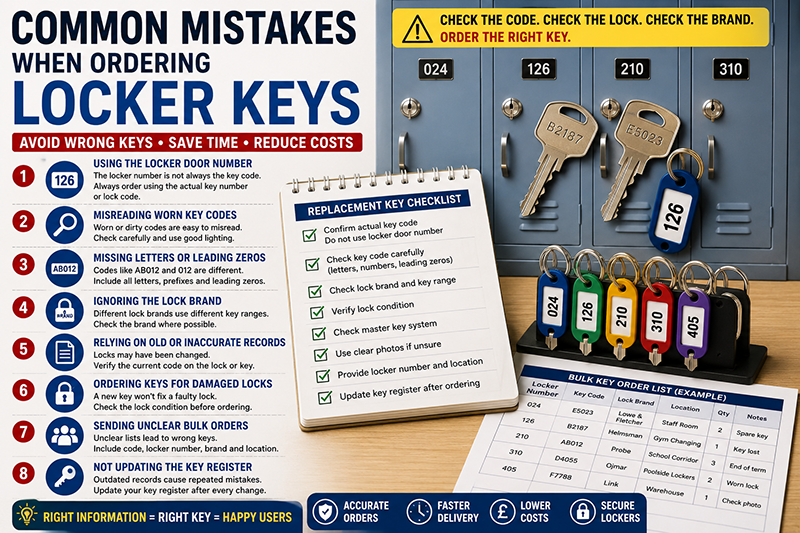
Ordering locker keys should be straightforward when the correct details are available. However, many replacement key problems happen before the order is placed. A locker number may be mistaken for a key code. A worn number may be read incorrectly. A lock may have been changed, but the old register may still show the previous code.
These mistakes can lead to wrong keys, delayed access, unnecessary lock changes and extra work for schools, gyms, workplaces, universities, leisure centres and healthcare sites.
This guide explains the most common mistakes when ordering locker keys, how to avoid them and what information to check before ordering replacement locker keys cut to code.
This article supports our main Locker Keys UK replacement and key management guide. For direct ordering, use Total Locker Service for replacement locker keys cut to code.

Quick Answer: What Is the Most Common Mistake When Ordering Locker Keys?
The most common mistake is ordering from the visible locker door number instead of the actual key number or lock code. The locker number helps users find the compartment. The key code identifies the lock and is normally used to cut the replacement key.
For example, a locker door may show 126, but the correct key code may be B2187. Ordering “key 126” may not work unless 126 has been confirmed as the actual lock code.
Before ordering, check the key, lock face, lock barrel, spare key, key register or previous order record. Also check the lock brand where possible, especially on sites with mixed locker systems.
For the key code check, read where to find a locker key number or lock code.
Mistake 1: Using the Locker Door Number as the Key Code
The visible locker door number is not always the key code. This is the largest cause of wrong replacement key orders.
The locker door number is usually shown on a number plate, disc, label or tag. It helps pupils, staff, members or visitors find the right locker. The key code is different. It identifies the lock and is used to cut the replacement key.
Sometimes the two numbers match. However, this should never be assumed. A site may have changed locks, replaced doors, added number discs or reused key tags over time.
| Visible locker number | Actual key code | What to order from |
|---|---|---|
| 024 | E5023 | E5023 |
| 126 | B2187 | B2187 |
| 210 | AB124 | AB124 |
| 310 | 310 | 310, only if confirmed as the code |
When placing an order, include both values if possible. The key code tells the supplier what to cut. The locker number helps your site match the key to the correct locker when the order arrives.
For the full explanation, read locker key numbers vs locker door numbers.
Mistake 2: Misreading a Worn or Damaged Key Code
Locker key codes can become hard to read. Older keys may be scratched, worn smooth or covered by tags, rings or grime. Lock faces can also become worn, especially in busy changing rooms, schools and staff areas.
A single wrong character can produce the wrong key. A 6 may look like an 8. A 1 may look like a 7. The letter O may look like zero. The letter B may look like an 8.
- Check both sides of the original key.
- Clean the key gently before reading the code.
- Use good lighting.
- Check the lock face as well as the key.
- Compare the code with the key register or spare key.
- Take clear photographs if the code is uncertain.
- Do not guess unclear digits.
If the code is uncertain, mark it as uncertain before ordering. It is better to delay one unclear line than to order a batch of wrong keys.
Mistake 3: Missing Letters, Prefixes or Leading Zeros
Key codes should be written exactly as shown. Letters, prefixes, suffixes and leading zeros can matter.
For example, AB012 may not be the same as AB12. Code 024 may not be the same as 24. A code beginning with D may belong to a different range from the same number without the letter.
| Code on key or lock | Incorrect version | Why it matters |
|---|---|---|
| AB012 | AB12 | The leading zero may be part of the code. |
| D4055 | 4055 | The letter prefix may identify the range. |
| 024 | 24 | The leading zero may be required. |
| B2187 | 82187 | A letter may be mistaken for a number. |
When creating a key order list, use a text format rather than a number-only spreadsheet field. Some spreadsheet software may remove leading zeros automatically unless the column is formatted correctly.
For register setup, read how to build a locker key register.
Mistake 4: Ignoring the Lock Brand or Key Range
The key code is essential, but the lock brand can also matter. Different locker lock brands may use different key blanks, profiles and code ranges. Two codes may look similar but belong to different lock systems.
Commercial locker systems may include lock brands and ranges associated with Probe, Helmsman, Lowe & Fletcher, Ojmar, ASSA, Link, Garran, Pure and other locker lock systems. The visible locker brand and lock brand may not always be the same.
This matters when a site has mixed locker installations. A school may have added lockers over several years. A gym may have refurbished one changing room but not another. A workplace may have replaced individual locks after damage.
- Check the key head for a brand name or logo.
- Check the lock face for markings.
- Check old invoices or installation records.
- Check the locker key register.
- Take a photo of the lock face and full locker door where uncertain.
- Do not assume all lockers on site use the same lock range.
For why brands matter, read are locker keys universal? why key codes and brands matter.
Mistake 5: Relying on Old Records Without Checking the Current Lock
Old key records can be useful, but they should not be treated as perfect. A locker may have had its lock replaced since the register was created. A key tag may have been swapped. A spare key may have been labelled incorrectly.
If the record says one code but the lock face or current key shows another, stop before ordering. The replacement key needs to match the lock fitted now, not the lock that was fitted years ago.
This is especially important after repairs, refurbishments, staff changes, changing room upgrades or end-of-year school key returns.
- Check whether the lock has been replaced.
- Compare the current lock face with the register.
- Check any spare key against the current lock.
- Update the register after every lock change.
- Mark old or uncertain records clearly.
- Use the current lock as the final reference when records conflict.
A live register prevents this issue. An outdated register can cause repeated wrong orders.
Mistake 6: Ordering Replacement Keys for Damaged Locks
A replacement key will not repair a damaged lock. If the lock barrel is loose, the keyway is blocked, the cam is bent or the lock is stiff, a new key may still fail.
Before ordering a replacement key, check that the lock still works. If the old key is available, test it carefully. Do not force it. If the door is open, check that the cam turns and secures the locker correctly.
- The key should enter smoothly.
- The lock should turn without force.
- The cam should secure the door.
- The barrel should not be loose.
- The key should not bend during use.
- The keyway should not be blocked or damaged.
- The lock should not show serious corrosion or wear.
If the lock is damaged, replace or repair the lock rather than only ordering a key. This is especially important in wet changing rooms, industrial workplaces and heavily used school corridors.
For repair decisions, read worn locker keys and stiff locks: repair or replace? and broken locker key: what to do before replacing the lock.
Mistake 7: Ignoring Master-Keyed Locker Systems
Some locker systems are master-keyed. This means authorised staff may have a master key that opens a group of compatible locks. Replacing a user key usually keeps the system intact, but replacing a lock with the wrong type can break master key compatibility.
If the site has a master key, check whether the affected lock belongs to that master-keyed group before replacing it. A random replacement lock may work with its own user key but fail to work with the site master key.
- Record whether each lock is part of a master-keyed group.
- Check the master key group before replacing locks.
- Use replacement user keys where the lock still works.
- Test master key access after lock replacement where appropriate.
- Update the key register after any lock change.
For access control detail, read locker master keys explained.
Mistake 8: Sending an Unclear Bulk Replacement Key Order
Bulk orders can save time, but only when the order list is clear. A list that contains only locker numbers may not be enough. The supplier needs the actual key codes, and your site needs enough information to match the keys back to the right lockers.
A good bulk order list should include locker number, key code, lock brand, location, quantity and notes. It should separate confirmed codes from uncertain codes.
| Locker number | Key code | Lock brand | Location | Quantity | Status |
|---|---|---|---|---|---|
| 024 | E5023 | Lowe & Fletcher | Staff room | 2 | Confirmed |
| 126 | B2187 | Helmsman | Gym changing | 1 | Confirmed |
| 157 | D4055 | Ojmar | Poolside | 2 | Check photo |
| 210 | AB124 | Probe | School corridor | 3 | Confirmed |
Do not mix guessed codes with confirmed codes without marking them. This creates confusion and increases the risk of wrong keys.
For larger order preparation, read bulk replacement locker keys for schools and workplaces.
Mistake 9: Not Checking Spare Keys Before Ordering
Before ordering a replacement, check whether a spare key already exists. Many sites have spare keys in a key cabinet, office, maintenance store or facilities area, but the records may be incomplete.
A spare key can confirm the correct key code. It may also allow staff to open a locked locker without forcing the door. However, the spare key should be tested carefully and matched against the register.
- Check the spare key cabinet.
- Check old key boards and labelled hooks.
- Check maintenance records.
- Check whether the spare key code matches the lock.
- Do not rely only on handwritten labels.
- Update the register if the spare key is missing.
For key storage guidance, read key cabinets for managing locker keys.
Mistake 10: Failing to Update the Register After the Order
The order process does not end when the keys arrive. The new keys should be tested, labelled, stored and recorded. If the register is not updated, the same confusion may happen again later.
After replacement keys arrive, test them in the correct locks. Attach the correct tag, disc or wrist strap. Store spare keys securely. Mark missing keys as replaced. Add any notes about locks that still feel stiff or uncertain.
- Check the delivery against the order list.
- Test each replacement key carefully.
- Do not force a key that does not turn smoothly.
- Attach the correct visible locker number tag.
- Store spare keys in the correct place.
- Update the key register immediately.
- Record any lock that needs repair or replacement.
This final step turns a replacement order into a better key management system.
Replacement Locker Key Ordering Checklist
Use this checklist before ordering replacement locker keys.
- Confirm the actual key number or lock code.
- Check whether the locker door number is different from the key code.
- Include letters, prefixes and leading zeros.
- Check the lock brand where known.
- Check whether the lock still works.
- Check whether a spare key already exists.
- Check whether the lock is part of a master-keyed group.
- Use photos for unclear codes.
- Separate confirmed codes from uncertain codes.
- Record the locker location on large sites.
- Update the register after replacement keys arrive.
Total Locker Service supplies replacement locker keys cut to code for many common locker systems.
Common Ordering Mistakes by Sector
Different sites make different ordering mistakes. The table below shows the most common risks by sector.
| Sector | Common mistake | Best prevention | Useful guide |
|---|---|---|---|
| Schools | Ordering from pupil-reported locker numbers | Check the school key register before ordering | School locker keys |
| Gyms | Confusing wrist strap numbers with key codes | Record actual lock codes separately | Gym locker keys |
| Leisure centres | Ordering keys without checking worn wet-area locks | Inspect straps, tags and lock condition first | Leisure centre locker keys |
| Workplaces | Not checking leaver keys or reassigned lockers | Use a staff locker key register | Staff locker keys |
| Universities | Using flat locker numbers across several buildings | Include campus, building and key code | University locker keys |
| Healthcare | Not controlling spare keys and role changes | Use secure staff key records | Healthcare locker keys |
What to Send When the Key Code Is Unclear
If the key code is unclear, provide supporting information rather than guessing. Clear photos can help identify the lock or confirm a difficult code.
- A close-up photo of the key code.
- A photo of both sides of the key.
- A close-up photo of the lock face.
- A wider photo of the full locker door.
- A photo of any brand marking.
- The visible locker number.
- The site’s best reading of the code.
- The lock brand, if known.
- The quantity required.
Good photos reduce uncertainty. They are especially useful for old lockers, worn codes and mixed lock systems.
What to Do When a Replacement Key Does Not Work
If a replacement key does not work, do not force it. Forcing the wrong key can damage the key, keyway or lock barrel.
Check the order list, key code, locker number, lock brand and current lock condition. Compare the replacement key against the code used for ordering. Then check whether the lock may have been changed, whether the code was misread or whether the lock itself is faulty.
- Stop using the key if it does not turn smoothly.
- Check whether the key enters the lock correctly.
- Check the code used for ordering.
- Check whether the locker door number was mistaken for the key code.
- Check whether the lock brand was correct.
- Check whether the lock is stiff or damaged.
- Check current lock markings against the old register.
- Take photos and update the supplier if needed.
A non-working replacement key usually points to a code, brand, record or lock condition issue.
Common Mistakes Control Table
| Mistake | Likely result | How to avoid it |
|---|---|---|
| Using the door number as the key code | Wrong replacement key | Check the actual key code before ordering |
| Misreading a worn code | Wrong cut pattern | Use good lighting and photos |
| Missing a prefix or leading zero | Wrong key range | Write the code exactly as shown |
| Ignoring the lock brand | Wrong blank or profile | Record lock brands where known |
| Using old records | Key may not match current lock | Check current lock markings |
| Ordering for a damaged lock | New key still fails | Check lock condition first |
| Ignoring master key compatibility | Management access may fail | Record master key groups |
| Not updating the register | Future orders repeat the same mistake | Update records after every order |
Related Locker Key Guides
This article is part of the locker keys canister. Use these guides to check key codes, build records, prepare bulk orders and manage replacement locker keys accurately.
- Locker Keys UK: Replacement, Cut-to-Code Ordering and Key Management Guide
- Replacement Locker Keys Cut to Code: What It Means
- Where to Find a Locker Key Number or Lock Code
- Locker Key Numbers vs Locker Door Numbers
- How to Build a Locker Key Register
- Bulk Replacement Locker Keys for Schools and Workplaces
- Are Locker Keys Universal? Why Key Codes and Brands Matter
- Lost Locker Key? What Schools, Gyms and Workplaces Should Do
- Locker Master Keys Explained
- School Locker Keys: Replacement and Key Control Guide
- Gym Locker Keys: Replacement, Wrist Straps and Member Access
- Locker Keys: Staff Storage and Replacement Process
- Leisure Centre Locker Keys: Managing Wet-Area Key Loss
- University Locker Keys: Managing Large Key Schedules
- Healthcare Locker Keys: Staff Storage and Secure Control
- Key Cabinets for Managing Locker Keys
- Locker Key Audit Checklist for Facilities Managers
Ordering Replacement Locker Keys Correctly
Replacement locker key ordering is much easier when the correct key code, lock brand and locker record are available. Before ordering, check whether the number you have is the actual key code or only the visible locker number.
If the lock still works and the key code is known, a replacement key can often be cut to code without replacing the full lock. If the lock is damaged, insecure or impossible to identify, lock replacement may be the better option.
For direct ordering, visit Total Locker Service: Locker Keys and Replacement Locker Keys.
Common Mistakes When Ordering Locker Keys FAQs
What is the most common mistake when ordering locker keys?
The most common mistake is using the visible locker door number instead of the actual key number or lock code used to cut the replacement key.
Is the locker number enough to order a replacement key?
Only if the locker number is confirmed as the actual key code. Many locker door numbers are user-facing labels and are not the same as the lock code.
Why do leading zeros matter when ordering locker keys?
Leading zeros may be part of the key code. A code such as 024 may not be the same as 24, so the code should be written exactly as shown.
Why does the lock brand matter when ordering replacement keys?
The lock brand can help identify the correct key range, blank and profile. Similar-looking codes may belong to different lock systems.
Should I order a replacement key if the lock is damaged?
Not always. If the lock is stiff, damaged, insecure or impossible to identify, replacing or repairing the lock may be better than ordering a key.
What should a bulk locker key order include?
A bulk locker key order should include the key code, locker number, lock brand, location, quantity required and notes or photos for unclear codes.
What should I do if a replacement locker key does not work?
Do not force it. Check the key code, locker number, lock brand, order details and lock condition, then compare the current lock against the register.