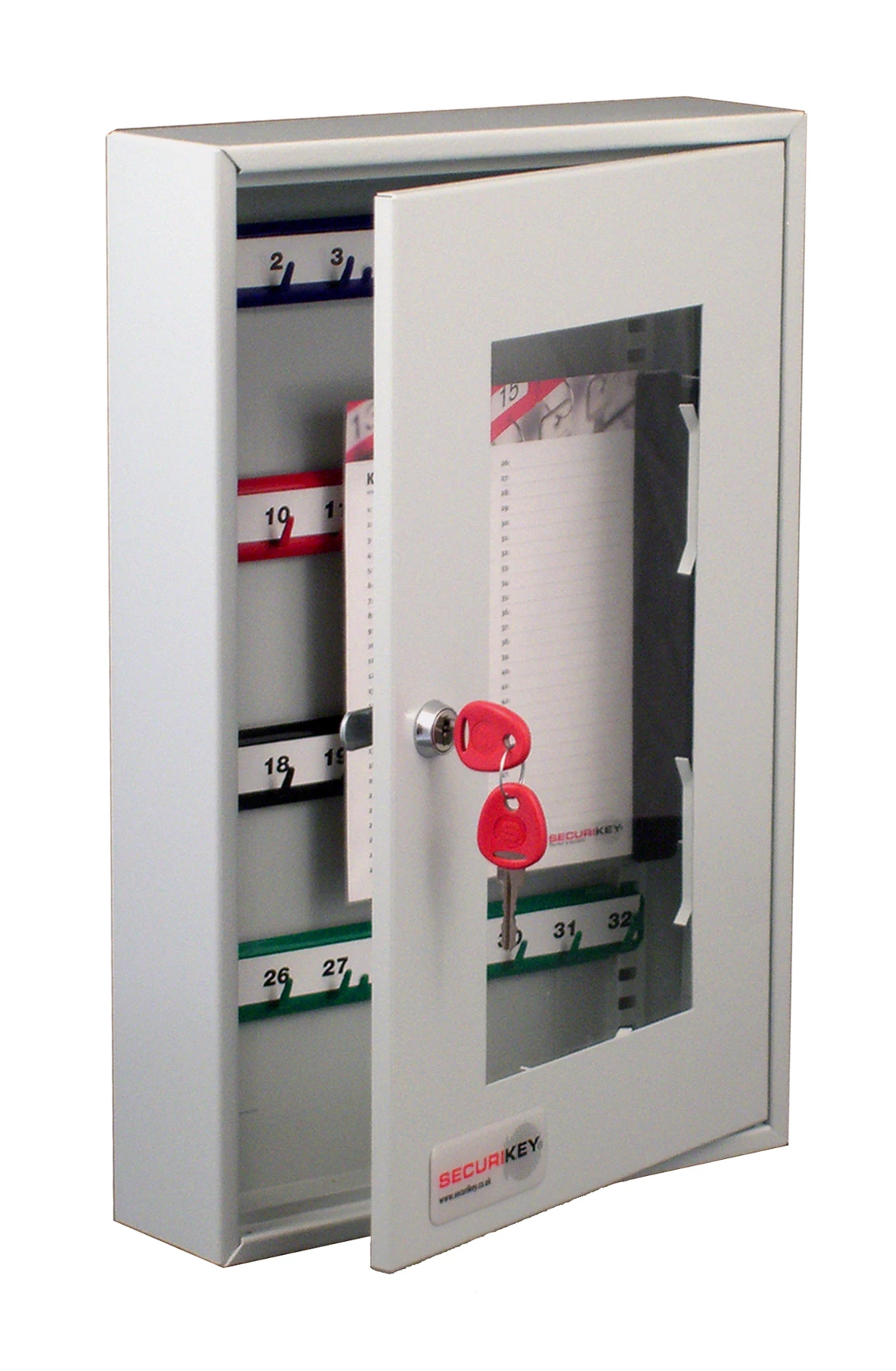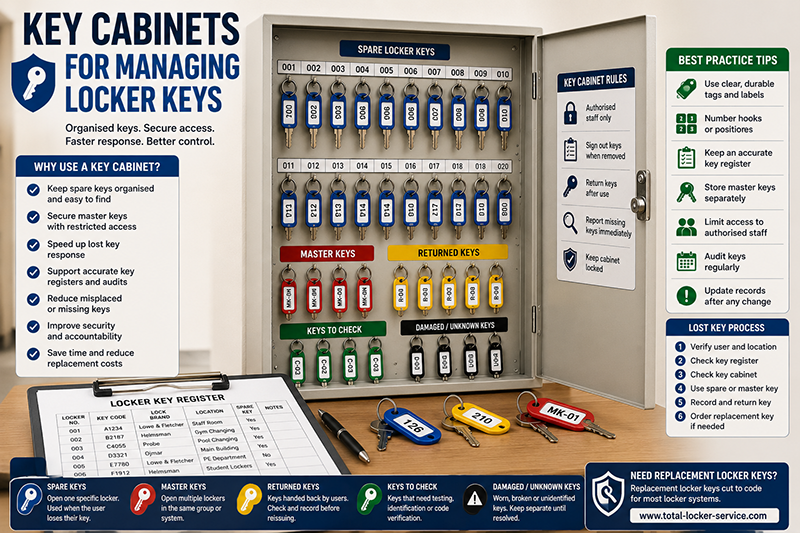
Key cabinets help schools, gyms, workplaces, universities, healthcare sites and leisure centres manage locker keys more securely. They provide a controlled place for spare keys, master keys, returned keys, replacement keys and keys awaiting reissue.
A locker key system is only reliable when staff can find the right key quickly. If spare keys are loose in drawers, mixed with unrelated keys or labelled poorly, a simple lost key issue can become a slow access problem. A key cabinet helps keep locker keys organised, recorded and protected.
This guide explains how to use key cabinets for managing locker keys, how to organise spare keys, how to control master keys and how to connect the cabinet to a locker key register.
This article supports our main Locker Keys UK replacement and key management guide. For direct ordering, use Total Locker Service for replacement locker keys cut to code.

Quick Answer: How Should Key Cabinets Be Used for Locker Keys?
Key cabinets should be used to store spare locker keys, master keys, returned keys and replacement keys in a clear, controlled and auditable way. Each key should be labelled with the visible locker number, linked to the actual key code in the locker key register and stored on a numbered hook or in a defined cabinet position.
The key cabinet should not replace the register. The cabinet stores the physical keys. The register records the actual key code, lock brand, locker location, issued user, spare key status and master key group.
Master keys should be stored separately or clearly marked with restricted access. A master key can open more than one compatible locker lock, so it needs stronger control than a normal spare key.
For the register structure, read how to build a locker key register. For master key control, read locker master keys explained.
Why Key Cabinets Matter for Locker Key Control
A key cabinet gives locker keys a fixed home. This reduces time spent searching for spare keys, improves staff access control and makes audits easier.
Without a key cabinet, spare locker keys often end up in desk drawers, site offices, reception trays, maintenance toolboxes or unlabelled key rings. That may work for a short time, but it usually creates problems when staff change, lockers are reassigned or keys need replacing.
- Spare keys are easier to find.
- Master keys can be kept under tighter control.
- Lost key incidents can be resolved faster.
- Key audits become simpler.
- Returned keys can be stored before reissue.
- Replacement keys can be matched to lockers quickly.
- Old, damaged or unknown keys can be separated for checking.
- Staff no longer need to rely on memory or loose notes.
A key cabinet is most useful when it is part of a wider system. That system should include clear key tags, a key register, a lost key process and regular audits.
What Locker Keys Should Be Stored in a Key Cabinet?
A key cabinet can store several types of locker keys. Each type should be labelled and recorded clearly.
| Key type | What it does | Cabinet control needed |
|---|---|---|
| Spare key | Opens one specific locker | Store by locker number and record key code in the register |
| Master key | Opens a group of compatible locks | Restrict access and record the master key group |
| Returned key | Key handed back by a pupil, member or staff user | Check against register before reissue |
| Replacement key | New key cut to code after loss or damage | Test, tag and store or issue immediately |
| Damaged key | Worn, bent, snapped or unreliable key | Separate from usable keys and mark for review |
| Unknown key | Key with unclear locker match | Quarantine until identified |
Do not mix usable spare keys with damaged or unknown keys. A separate “check” section in the cabinet prevents staff from reissuing keys that may not work.
Spare Locker Keys
Spare locker keys are backup keys for individual lockers. They are useful when a user loses a key, forgets a key, breaks a key or leaves without returning it.
Each spare key should be easy for authorised staff to identify. The tag should normally show the visible locker number. The actual key code should be recorded in the locker key register.
- Store spare keys on numbered hooks or labelled positions.
- Use clear tags that match visible locker numbers.
- Record the actual key code separately.
- Check spare keys during audits.
- Replace missing spare keys before they are needed urgently.
- Do not give spare keys directly to unauthorised users.
- Update the register when spare keys are issued or replaced.
For number confusion, read locker key numbers vs locker door numbers.
Locker Master Keys
Master keys need stricter control than normal spare keys. A spare key usually opens one locker. A master key may open many compatible locks in the same system.
Because of that wider access, master keys should not be left loose in the same section as everyday spare keys. They should be stored in a restricted section of the cabinet, a separate cabinet, a locked safe or a controlled office.
- Store master keys separately from ordinary spare keys.
- Label master keys by reference, not by unnecessary location detail.
- Record which locker group each master key opens.
- Restrict access to authorised staff only.
- Record use where personal belongings are involved.
- Audit master keys more frequently than ordinary spare keys.
- Investigate a missing master key immediately.
A missing master key is more serious than a missing user key because it may affect several lockers. For more detail, read locker master keys explained.
How to Organise a Key Cabinet for Locker Keys
The cabinet should be organised in a way that staff can understand quickly. A neat cabinet reduces errors, especially during busy periods such as school term ends, gym peak times, workplace shift changes or university accommodation moves.
The simplest approach is to organise keys by locker location and visible locker number. Larger sites may need separate cabinets or cabinet sections for each building, department, changing room or locker bank.
- Group keys by site area or locker bank.
- Use numbered hooks or labelled cabinet positions.
- Attach durable tags to each spare key.
- Keep master keys in a restricted section.
- Separate damaged, unknown and returned keys from active spare keys.
- Keep a printed cabinet index nearby if useful.
- Make sure the cabinet layout matches the key register.
- Update the cabinet after every key issue, return or replacement.
The cabinet should support the staff workflow. If staff cannot find keys quickly, the layout needs simplifying.
Key Cabinet Numbering System
A key cabinet numbering system should be clear and consistent. Each hook or position should have a reference that connects to the locker key register.
For small sites, the hook number may match the visible locker number. For larger sites, it is usually better to include the location as well as the locker number.
| Cabinet reference | Locker location | Locker number | Key code | Notes |
|---|---|---|---|---|
| A-024 | Staff changing room | 024 | E5023 | Spare key present |
| A-126 | Gym changing room | 126 | B2187 | Wrist strap fitted |
| B-210 | School corridor | 210 | AB124 | Replacement ordered |
| MK-01 | Pool changing room | Master group | Restricted | Authorised staff only |
The cabinet can show the visible locker number. The register should hold the actual key code. Do not rely on the hook label alone for replacement key ordering.
Link the Key Cabinet to a Locker Key Register
A key cabinet stores the physical key. A key register stores the information needed to manage that key. The two should work together.
The register should show the cabinet position, visible locker number, actual key code, lock brand, location, spare key status and master key group. This prevents staff from guessing when a replacement key is needed.
| Register field | Example | Why it matters |
|---|---|---|
| Cabinet position | A-126 | Shows where the spare key is stored |
| Locker number | 126 | Matches the visible locker door or tag |
| Key code | B2187 | Used to order replacement locker keys |
| Lock brand | Helmsman | Helps match the correct key range |
| Location | Gym changing room | Useful on large sites |
| Spare key status | Present / missing / issued | Supports audits and lost key response |
| Master key group | MK-01 | Supports controlled management access |
For the full register guide, read how to build a locker key register.
Who Should Access the Key Cabinet?
Access to the key cabinet should be limited to authorised staff. The right people depend on the site. In a school, this may be the site team, school office or facilities manager. Within a gym, it may be the duty manager and selected reception staff. In a workplace, it may be facilities, HR or department supervisors.
Not every staff member needs cabinet access. Too much access weakens control and makes audits harder.
- Limit access to named roles or authorised staff.
- Keep master key access even tighter than spare key access.
- Do not leave the cabinet unlocked during normal use.
- Record key removal where personal belongings are involved.
- Review access when staff leave or change roles.
- Keep cabinet keys or access codes secure.
- Do not store the cabinet key beside the cabinet.
If several people can remove keys without record, the cabinet becomes storage rather than control. A good cabinet process makes responsibility clear.
Key Cabinet Sign-Out Process
A sign-out process is useful when spare keys or master keys are removed from the cabinet. It does not need to be complicated, but it should show who took the key, why it was used and whether it was returned.
This is especially important when opening lockers that may contain personal belongings.
| Sign-out field | Example | Purpose |
|---|---|---|
| Date and time | 12/03/26 14:20 | Shows when the key was removed |
| Key reference | A-126 | Identifies the key used |
| Staff member | Duty manager | Shows authorised user |
| Reason | Member lost key | Explains why access was needed |
| Returned? | Yes | Confirms the key came back |
| Notes | Replacement key ordered | Records follow-up action |
Digital records can also work, but the process should be simple enough that staff actually use it.
Key Cabinets for School Locker Keys
Schools often manage hundreds of pupil locker keys. A key cabinet helps the school office, site team or pastoral staff manage spare keys, returned keys and end-of-term key checks.
The cabinet should be organised by year group, corridor, building or locker bank. Returned keys should be checked against the register before being reissued to another pupil.
- Store spare pupil locker keys by year group or corridor.
- Keep master keys away from ordinary spare keys.
- Use clear tags that match visible locker numbers.
- Record actual key codes in the register.
- Check returned keys at the end of term.
- Separate missing, damaged and unknown keys.
- Prepare bulk replacement orders from confirmed codes.
For school-specific guidance, read school locker keys: replacement and key control guide and how to reduce lost locker keys in schools.
Key Cabinets for Gyms and Leisure Centres
Gyms and leisure centres need fast access to spare keys, especially during busy changing room periods. A member may lose a key while belongings are locked inside. Staff need a controlled way to restore access without damaging lockers.
The cabinet should be organised by changing room, pool area, gym area or locker bank. Wet-area keys should be checked regularly because wrist straps, tags and split rings can wear faster.
- Store spare changing room keys by locker area.
- Keep wrist strap spares and number tags nearby where useful.
- Record actual key codes separately from tag numbers.
- Control master keys tightly.
- Verify users before opening lockers containing belongings.
- Check wet-area keys and straps during audits.
- Replace missing spare keys before peak-use periods.
For gym and leisure guidance, read gym locker keys: replacement, wrist straps and member access, how to reduce lost locker keys in gyms and leisure centre locker keys: managing wet-area key loss.
Key Cabinets for Workplaces and Healthcare Sites
Workplaces and healthcare sites often use lockers for staff storage, uniforms, PPE, changing rooms, bags and personal belongings. A key cabinet helps manage spare keys and leaver returns.
For assigned staff lockers, the cabinet should connect to staff issue records. When someone leaves or changes role, the key should be returned, checked and either stored or reissued through the register.
- Store staff locker spare keys securely.
- Record department, shift area or staff location where useful.
- Include locker key return in leaver processes.
- Keep master keys restricted to authorised staff.
- Separate spare keys from damaged or unknown keys.
- Update the register when locks or keys are replaced.
- Audit keys during facilities or HR reviews.
For related guidance, read locker keys: staff storage and replacement process and healthcare locker keys: staff storage and secure control.
Key Cabinets for Universities and Large Sites
Universities and large estates may need several key cabinets rather than one central cabinet. Lockers may be spread across buildings, sports centres, departments, libraries, laboratories, accommodation areas and staff spaces.
A large site should decide whether keys are managed centrally, locally or by department. The key register should show which cabinet holds the spare key for each locker area.
- Use cabinet references by building or department.
- Record duplicate locker numbers carefully.
- Separate cabinet location from locker location.
- Keep master key groups clear.
- Use controlled access for departmental cabinets.
- Audit local cabinets on a planned schedule.
- Standardise labels and register fields across the site.
For larger key schedules, read university locker keys: managing large key schedules.
Using a Key Cabinet After a Lost Locker Key
A lost locker key is one of the main reasons staff need the key cabinet. The cabinet should help staff find a spare key quickly, restore access safely and identify the correct replacement key code.
- Confirm the locker number and location.
- Check the locker key register.
- Check the cabinet position for a spare key.
- Verify the user where belongings are involved.
- Use the spare key or authorised master key if appropriate.
- Identify the actual key code.
- Order a replacement key if the lock still works.
- Return the spare key to the cabinet.
- Update the register after the issue is resolved.
Do not use the visible cabinet hook number as the replacement key code unless the register confirms it. For lost key response, read lost locker key: what schools, gyms and workplaces should do.
Using a Key Cabinet for Replacement Key Orders
A key cabinet helps with replacement key ordering because it shows which spare keys are missing, damaged or available. However, the order should still be prepared from the actual key code in the register.
Before ordering replacement locker keys, check the key, lock face, key register and cabinet record. Include the key code, visible locker number, lock brand, location and quantity required.
- Check which spare keys are missing from the cabinet.
- Confirm the actual key code before ordering.
- Check lock brand where known.
- Check whether the lock still works.
- Separate damaged locks from missing keys.
- Order from confirmed key codes.
- Test replacement keys when they arrive.
- Tag and store spare replacements immediately.
For bulk orders, read bulk replacement locker keys for schools and workplaces. For ordering errors, read common mistakes when ordering locker keys.
Key Cabinet Security
The key cabinet itself needs protection. A key cabinet that is left unlocked, poorly located or widely accessible may weaken locker security rather than improve it.
The cabinet should be fixed or placed in a controlled staff area. Access should be limited. Cabinet keys, codes or electronic access should be controlled in the same way as other important site keys.
- Place the cabinet in a staff-only or controlled area.
- Keep the cabinet locked when not in use.
- Limit access to authorised staff.
- Do not store cabinet access details openly.
- Review access when staff change roles.
- Keep master keys in a restricted section.
- Investigate missing keys quickly.
- Audit the cabinet regularly.
The level of security should match the risk. A cabinet holding master keys for many lockers needs stronger control than a small spare-key board for a few low-risk lockers.
Common Key Cabinet Mistakes
Key cabinets improve control only when they are used correctly. Poor labelling, missing records and uncontrolled access can recreate the same problems inside the cabinet.
- Storing keys without matching register records.
- Using hook numbers as key codes without checking.
- Mixing master keys with ordinary spare keys.
- Leaving damaged keys in active use sections.
- Not recording when keys are removed.
- Allowing too many staff to access the cabinet.
- Failing to update the cabinet after replacement keys arrive.
- Keeping old keys after locks have been changed.
- Not auditing spare keys regularly.
- Using handwritten labels that fall off or become unreadable.
The cabinet should reduce uncertainty. If it creates uncertainty, the layout and register need correcting.
Key Cabinet Audit Checklist
A key cabinet should be audited regularly. The frequency depends on the site. Schools may audit at the end of term. Gyms and leisure centres may audit monthly. Workplaces may audit during leaver checks or annual facilities reviews.
- Check every cabinet hook or position.
- Check each spare key is present.
- Check each visible locker number.
- Check actual key codes against the register.
- Check master keys separately.
- Check damaged, unknown or returned keys.
- Check key tags, split rings and wrist straps.
- Remove obsolete keys after lock changes.
- Mark missing spare keys clearly.
- Prepare replacement key orders from confirmed codes.
- Update the register after the audit.
- Review who has cabinet access.
For a wider facilities process, read the locker key audit checklist for facilities managers.
Key Cabinet Control Table
| Situation | Best action | Useful guide |
|---|---|---|
| Spare key missing from cabinet | Check register and order replacement from confirmed key code | Replacement keys cut to code |
| Master key stored with normal keys | Move to restricted storage and update access process | Master keys explained |
| Key tag shows locker number only | Check actual key code before ordering replacements | Key number vs door number |
| Many keys missing after audit | Prepare bulk replacement list | Bulk replacement keys |
| Unknown key found in cabinet | Quarantine and identify before reissue | Find a key number |
| Damaged key stored as spare | Remove from active use and order replacement | Broken locker key guide |
Key Cabinet Setup Checklist
- Choose a cabinet size that fits the locker estate.
- Group keys by location, locker bank or department.
- Use clear numbered hooks or positions.
- Tag each spare key with the visible locker number.
- Record the actual key code in the register.
- Store master keys separately or in a restricted section.
- Separate active, damaged, returned and unknown keys.
- Limit access to authorised staff.
- Use a sign-out process where needed.
- Audit the cabinet regularly.
- Update the register after every key or lock change.
- Order replacement keys from confirmed key codes.
Related Locker Key Guides
This article is part of the locker keys canister. Use these guides to support key cabinet setup, replacement key ordering, spare key control and long-term locker key management.
- Locker Keys UK: Replacement, Cut-to-Code Ordering and Key Management Guide
- How to Build a Locker Key Register
- Locker Master Keys Explained
- Replacement Locker Keys Cut to Code: What It Means
- Lost Locker Key? What Schools, Gyms and Workplaces Should Do
- Where to Find a Locker Key Number or Lock Code
- Locker Key Numbers vs Locker Door Numbers
- Bulk Replacement Locker Keys for Schools and Workplaces
- Common Mistakes When Ordering Locker Keys
- Locker Key Tags, Number Discs and Wrist Straps Explained
- Locker Key Audit Checklist for Facilities Managers
- School Locker Keys: Replacement and Key Control Guide
- Gym Locker Keys: Replacement, Wrist Straps and Member Access
- Locker Keys: Staff Storage and Replacement Process
- Healthcare Locker Keys: Staff Storage and Secure Control
- University Locker Keys: Managing Large Key Schedules
Ordering Replacement Locker Keys from Key Cabinet Records
A key cabinet makes replacement ordering easier because it shows which spare keys are present, missing or damaged. However, the replacement order should be based on the actual key code, not only the cabinet hook number or visible locker number.
Before ordering, confirm the key code, lock brand, visible locker number, location and quantity required. If the code is unclear, take clear photographs of the lock face, keyway, key and any markings.
For direct ordering, visit Total Locker Service: Locker Keys and Replacement Locker Keys.
Key Cabinets for Managing Locker Keys FAQs
Why use a key cabinet for locker keys?
A key cabinet gives spare locker keys, master keys and returned keys a controlled storage location. It helps staff find keys quickly, reduce lost key problems and support audits.
What locker keys should be stored in a key cabinet?
A key cabinet can store spare locker keys, master keys, returned keys, replacement keys and keys awaiting identification or repair.
Should master keys be kept in the same key cabinet?
Master keys can be kept in the same cabinet only if access is restricted and they are separated clearly from ordinary spare keys. Many sites use a restricted section or separate secure storage for master keys.
Is a key cabinet the same as a locker key register?
No. The key cabinet stores the physical keys. The locker key register records the key code, locker number, lock brand, location, spare key status and issue history.
Can replacement locker keys be ordered from key cabinet numbers?
Only if the cabinet number is confirmed as the actual key code. In most cases, replacement keys should be ordered from the recorded key number or lock code.
Who should have access to a locker key cabinet?
Access should be limited to authorised staff such as facilities teams, site managers, duty managers, school office staff or approved supervisors.
How often should a locker key cabinet be audited?
A locker key cabinet should be audited regularly. Schools may audit at term end, gyms may audit monthly, and workplaces may audit during leaver checks or facilities reviews.